

[May-2024] Updated and Accurate 220-1101 Questions & Answers for passing the exam Quickly
Download Real 220-1101 Exam Dumps for candidates. 100% Free Dump Files
NEW QUESTION # 302
A technician identified an issue on a workstation, obtained details from the user, and made a backup of the system. Which of the following should the technician do NEXT?
- A. Establish a theory of probable cause, researching internally or externally as needed.
- B. Determine the next steps to resolve the issue and document it.
- C. Document the findings, actions, and outcomes.
- D. Design a plan of action to resolve the issue and implement the solution.
Answer: A
Explanation:
After the issue has been identified and the backup of the system has been made, the next step is to establish a theory of probable cause. This involves researching the issue to determine the root cause of the problem. This can involve researching internally (e.g. referring to the system logs) or externally (e.g. searching online). Once the probable cause has been identified, the technician can then move on to the next step of designing a plan of action to resolve the issue and implementing the solution.
NEW QUESTION # 303
A user needs to upgrade a PC in order to run the latest 3-D design software. Which of the following components should the user upgrade to best meet this requirement?
- A. CPU
- B. Power supply
- C. Graphics card
- D. Motherboard
- E. Memory
Answer: C
Explanation:
Explanation
The correct answer is D. Graphics card.A graphics card is a component that handles the processing and rendering of 3D graphics on a PC. A graphics card can significantly improve the performance and quality of 3D design software, as it can handle complex calculations and display high-resolution images faster than the CPU. A graphics card can also support features such as ray tracing, anti-aliasing, and texture mapping, which can enhance the realism and detail of 3D models.
A: Motherboard. This is not a correct answer. A motherboard is a component that connects and communicates with all the other components in a PC. A motherboard does not directly affect the performance or quality of
3D design software, unless it is incompatible or outdated with the other components.
B: CPU. This is not a correct answer. A CPU is a component that executes instructions and calculations for various programs on a PC. A CPU can affect the performance and quality of 3D design software, but not as much as a graphics card. A CPU is more important for tasks such as compiling, encoding, or multitasking, which are not specific to 3D design.
C; Power supply. This is not a correct answer. A power supply is a component that converts AC power from the wall outlet to DC power for the PC components. A power supply does not directly affect the performance or quality of 3D design software, unless it is insufficient or faulty to provide enough power for the other components.
E: Memory. This is not a correct answer. Memory is a component that stores data temporarily for fast access by the CPU and other components. Memory can affect the performance and quality of 3D design software, but not as much as a graphics card. Memory is more important for tasks such as loading, saving, or switching between programs, which are not specific to 3D design.
Reference: System requirements | Substance 3D Designer1, 12 Best Free 3D Modeling Software (For Beginners) 20232, System requirements for Autodesk 3ds Max 20213.
NEW QUESTION # 304
Which of the following would MOST likely be used to connect one or more devices lo the internet in a SOHO?
- A. Hub
- B. Ethernet gateway
- C. Router
- D. Wireless access point
Answer: C
Explanation:
Explanation
A router is a device that connects one or more networks, such as a home or small office network, to the internet. It allows multiple devices to share a single internet connection and provides network address translation (NAT) to enable communication between the devices on the local network and the internet. A hub, Ethernet gateway, or wireless access point does not provide this functionality.
A router is the most likely device to be used to connect one or more devices to the internet in a SOHO. A router can provide network address translation (NAT), firewall protection, and other features that are important for securing and managing a network. References: CompTIA A+ Certification Exam Guide, pg. 355
NEW QUESTION # 305
A user dropped a laptop while it was turned on. The hard drive now makes a clicking sound, and the laptop will not start up. Which of the following most likely explains this situation?
- A. The hard drive bracket screws are lose.
- B. The SATA cable is lose.
- C. The hard drive is damaged.
- D. The hard drive jumpers need to be reseated.
Answer: C
Explanation:
Explanation
A clicking hard drive is usually a sign of a mechanical failure, where the read/write heads are not functioning properly or the platters are scratched or broken. This can be caused by physical shock, such as dropping the laptop while it was turned on. A damaged hard drive may not be able to boot up the operating system or access the data stored on it. This is a serious problem that requires data recovery and hard drive replacement.
References
Identifying Hard Drive Sounds and Determining What They Mean
Hard Drive Clicking? See How to Fix Click Hard Drive On Your Own
Chapter 3: Hardware
NEW QUESTION # 306
Which of the following wireless technologies would a company most likely implement for inventory management?
- A. Bluetooth
- B. RFID
- C. 5G
- D. NFC
Answer: B
Explanation:
RFD stands for Radio Frequency Identification, which is a technology that uses radio waves to identify and track objects that have RFID tags attached to them. RFID tags are small devices that store information and can be read by RFID readers without direct contact or line of sight. RFID can be used for inventory management, as it can provide real-time visibility and accuracy of the location, quantity, and status of the items in a warehouse, store, or supply chain .
NEW QUESTION # 307
A user reports issues with a smartphone after dropping it. The icons on the screen all look normal, but when the user touches the email icon, for example, nothing happens. Which of the following is MOST likely the cause?
- A. Overheating
- B. Digitizer issues
- C. Malware
- D. Broken screen
Answer: B
Explanation:
Dropping a smartphone can damage the digitizer, which is the component responsible for sensing touch input. This can cause issues with tapping and swiping on the screen, as well as other touchscreen-related issues. Reference: CompTIA A+ Certification Exam Core 1 Exam Objectives - 3.3 Given a scenario, troubleshoot mobile device issues
NEW QUESTION # 308
A user's mobile phone gets really hot to the touch and does not retain a charge. The user also reports that the phone is very slow, especially while charging. Which of the following is MOST likely causing these symptoms?
- A. Defective battery
- B. Broken charging port
- C. CPU overheating
- D. Digitizer failure
Answer: A
Explanation:
Explanation
A defective battery is the most likely cause of a mobile phone that gets really hot to the touch, does not retain a charge, and is slow while charging. A defective battery can cause the phone to overheat and may also cause performance issues. References: CompTIA A+ Certification Exam Objectives 1001, 2.14
NEW QUESTION # 309
An online retailer would like to add capacity to support increased sales. Additional servers have been installed. Which of the following should be used to ensure each new server is being properly utilized?
- A. Virtualization
- B. Clustering
- C. Round-robin DNS
- D. Load balancer
Answer: D
Explanation:
https://www.resonatenetworks.com/2020/04/29/clustering-vs-load-balancing-whats-the-difference/
NEW QUESTION # 310
A technician is installing a WAP in the company break room. The new access point should have a rating of higher than 50Mbps and minimal range to avoid interference with other access points. Which of the following
802.11 standards should the technician select?
- A. B
- B. Ac
- C. G
- D. n
Answer: B
Explanation:
Explanation
Ac stands for 802.11ac, which is a wireless networking standard that operates in the 5 GHz frequency band and offers a maximum data rate of 1.3 Gbps. 802.11ac is also backward compatible with 802.11a, 802.11b,
802.11g, and 802.11n standards. If a technician wants to install a WAP (wireless access point) in the company break room that has a rating of higher than 50 Mbps and minimal range to avoid interference with other access points, they should select the 802.11ac standard.
NEW QUESTION # 311
Which of the following components enables the input on a mobile device's touch screen?
- A. CMOS sensor
- B. Inverter
- C. OLED
- D. Digitizer
Answer: D
Explanation:
Explanation
The digitizer is the component that enables input on a mobile device's touch screen. It is a transparent layer that sits over the screen and detects the location of touch inputs. OLED (Organic Light Emitting Diode) is a type of display technology. Inverter is a component used in older LCD displays to provide power to the backlight. CMOS (Complementary Metal-Oxide-Semiconductor) sensor is a type of image sensor used in digital cameras and smartphones to capture images. References: CompTIA A+ Certification Exam: Core 1 - Page 177
NEW QUESTION # 312
A technician has set up a new conference room with a TV and a video soundbar. The technician wants to test the system with a conference call. During the test, the TV speaker produces sound, but the soundbar does not. Which of the following is the MOST likely cause of the issue?
- A. The conference call needs to be unmuted for audio.
- B. The TV's HDMI-ARC port is not being used.
- C. The volume on the TV needs to be turned up.
- D. An incorrect HDMI cable is being used.
Answer: B
Explanation:
HDMI-ARC (Audio Return Channel) is an HDMI connection that allows audio to be sent from the TV to an external sound system, such as a soundbar. If the TV's HDMI-ARC port is not being used, then the soundbar will not receive any audio from the TV and thus will not produce any sound. To resolve the issue, the technician should ensure that the TV's HDMI-ARC port is being used to connect the TV to the soundbar.
NEW QUESTION # 313
Laura, a customer, has instructed you to configure her home office wireless access point.
She plans to use the wireless network for finances and has requested that the network be setup with the highest encryption possible.
Additionally, Laura knows that her neighbors have wireless networks and wants to ensure that her network is not being interfered with by the other networks.
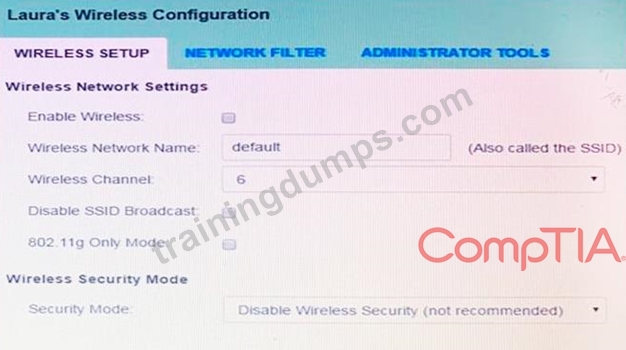
She requests that the default settings be changed to the following.
Wireless Name: HomeWiFi
Shared Key: CompTIA
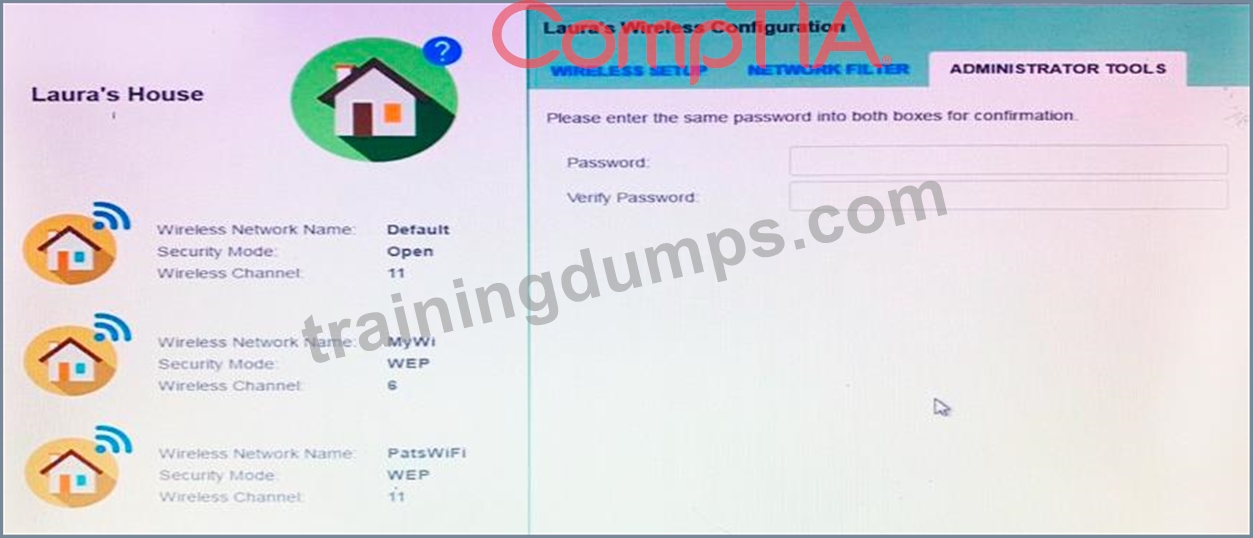
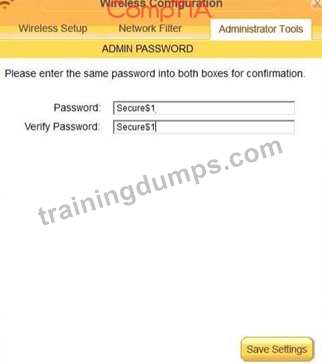
Router Password: Secure$1
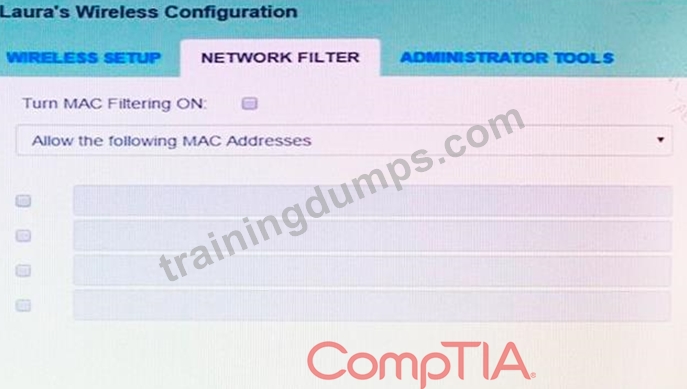
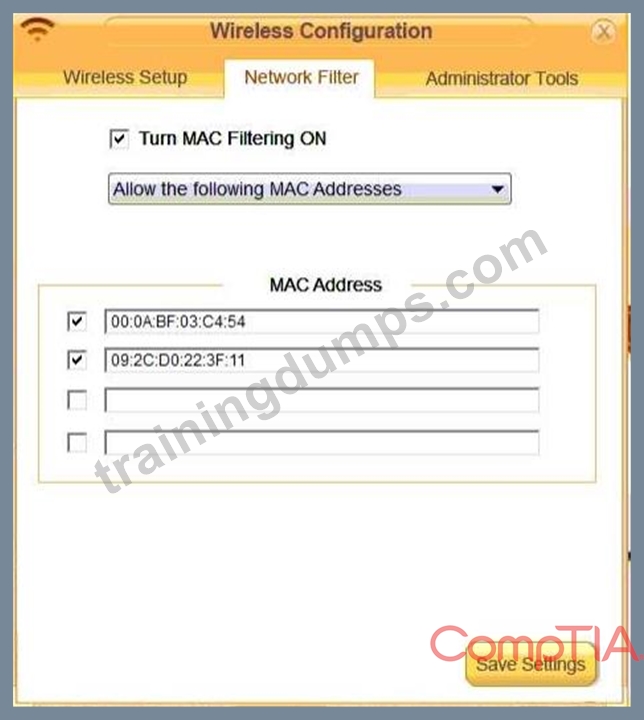
Finally, Laura wants to ensure that only her laptop and Smartphone can connect to the network.
Laptop: IP Address 192.168.1.100
Hardware Address: 00:0A:BF:03:C4:54
Smartphone: IP Address 192.168.1.101
Hardware Address: 09:2C:D0:22:3F:11
INSTRUCTIONS
Configure Laura's wireless network using the network adapter window.
If at any time you would like to bring back the initial state of the situation, please click the Reset All button.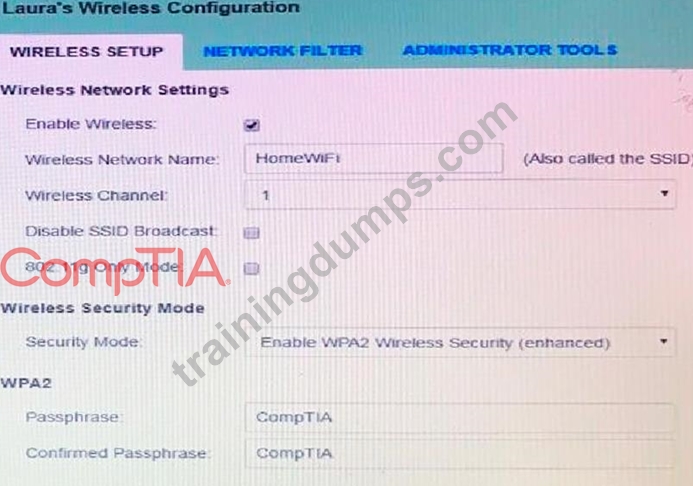
Answer:
Explanation:
solution as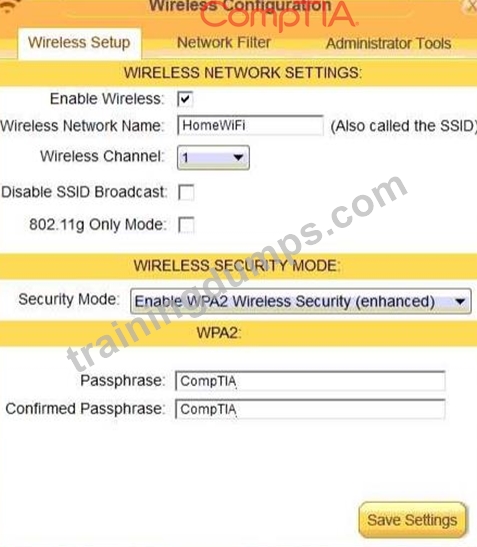
NEW QUESTION # 314
A user with a custom hosts file is having difficulty connecting to a locally hosted site on a small office network. The technician cannot ping the server hostname from the user's computer. Which of the following should the technician ensure on the server?
- A. The server's secondary NIC is functioning.
- B. The server is configured with a static IP address.
- C. The appropriate services are enabled on the server.
- D. The server does not have an APIPA.
Answer: B
Explanation:
A custom hosts file is a file that maps hostnames to IP addresses, allowing the user to access websites or servers by their names instead of their numerical addresses. For example, a user can add a line like 192.168.1.100 myserver.local to their hosts file and then access the server by typing myserver.local in their browser. However, this method only works if the IP address of the server does not change. If the server is configured with a dynamic IP address, which means it can be assigned a different IP address by the network router or DHCP server, then the hosts file entry will become invalid and the user will not be able to connect to the server by its hostname. Therefore, the technician should ensure that the server is configured with a static IP address, which means it has a fixed and permanent IP address that does not change. This way, the hosts file entry will always point to the correct IP address of the server and the user will be able to ping the server hostname from their computer.
Reference:
How to Add a Local DNS Lookup to Hosts File - Help Desk Geek1
Set Custom Domain Name for localhost Website in IIS - TutorialsTeacher.com2 The Official CompTIA A+ Core 1 Student Guide (Exam 220-1101) eBook, page 4-9
NEW QUESTION # 315
A technician needs to fix a computer that received a non-specific error after a scheduled computer restart. Which of the following is the best way to start troubleshooting?
- A. Roll back all of the recent updates.
- B. Update all of the firmware.
- C. Search for the error on the internet.
- D. Review the system event log.
Answer: D
Explanation:
The best way to start troubleshooting a non-specific error after a scheduled computer restart is to review the system event log. The system event log is a record of significant events that occur on the computer, such as errors, warnings, or information messages. The system event log can help identify the cause of the error and provide possible solutions. The answer is C.
To learn more about troubleshooting methods and tools, you can refer to the CompTIA A+ Certification Exam Core 1 Objectives1 or the CompTIA A+ Core 1 (220-1101) Certification Study Guide2. These resources cover the topics that are tested on the CompTIA A+ Core 1 exam, which is one of the two exams required to earn the CompTIA A+ certification. The CompTIA A+ certification validates your skills and knowledge as an entry-level IT professional.
NEW QUESTION # 316
A technician installed new firmware on the company's laser printers and has since been receiving multiple calls that information is garbled and looks like code. Only printers with the new firmware are having this issue. Which of the following steps should the technician complete NEXT?
- A. Install an updated printer driver on the print server
- B. Change the language settings on the printers
- C. Reboot all the printers.
- D. Reboot all the machines having the issues
Answer: A
Explanation:
The MOST efficient next step the technician should complete is to install an updated printer driver on the print server12. The issue of information being garbled and looking like code could be related to a compatibility issue with the new firmware and the existing printer driver1. The printer driver is responsible for converting the print job data into a format that the printer can understand and print2.
NEW QUESTION # 317
A technician is setting up a new desktop computer and will be installing the hard drive directly on the motherboard without using cables to connect it. Which of the following will the technician be installing?
- A. eSATA
- B. M.2
- C. SCSI
- D. Thunderbolt
Answer: D
NEW QUESTION # 318
Which of the following describes the main difference between T568A and T568B cabling standards?
- A. The standards use different cable connectors.
- B. The T568B data transfer rate is higher than T568A.
- C. T568A is used in blue cables, and T568B is used in green cables.
- D. The green and the orange cables are interchanged.
Answer: D
Explanation:
Explanation
he main difference between T568A and T568B cabling standards is that the green and orange cables are interchanged12. T568A is designed for backward compatibility with older telephone wires, while T568B is designed for better signal isolation and noise protection for newer networking systems and products3. T568A is used in blue cables, and T568B is used in green cables . The standards use the same cable connectors3.
NEW QUESTION # 319
A technician plans to upgrade a laptop's RAM from 4GB to 16GB. Which of the following should the technician do?
- A. Configure the laptop's BIOS settings for the RAM upgrade.
- B. Purchase the same brand of RAM.
- C. Purchase RAM with the same CAS latency.
- D. Purchase the same architecture of RAM.
Answer: D
Explanation:
The most important factor to consider when upgrading a laptop's RAM is the architecture of the RAM, which determines the type, speed, and capacity of the memory modules. The architecture of the RAM must match the architecture of the laptop's motherboard and processor, otherwise the RAM will not be compatible or function properly. The architecture of the RAM includes the DDR generation (such as DDR3 or DDR4), the form factor (such as SO-DIMM), the pin count (such as 204 or 260), the voltage (such as 1.35V or 1.5V), and the frequency (such as 1600MHz or 2400MHz).
The other options are not as crucial or relevant for the RAM upgrade. The brand of the RAM does not matter as long as the RAM meets the specifications of the laptop and is of good quality. The CAS latency of the RAM is a measure of the delay between the memory controller requesting data and the RAM delivering it, and it affects the performance of the RAM. However, the CAS latency is not a fixed value and can vary depending on the frequency and voltage of the RAM. Therefore, purchasing RAM with the same CAS latency is not necessary or sufficient for compatibility. The laptop's BIOS settings are usually configured to automatically detect and adjust to the RAM upgrade, and do not need to be manually changed by the technician.
Reference:
CompTIA A+ Certification Exam Core 1 Objectives1
The Official CompTIA A+ Core 1 Student Guide (Exam 220-1101) eBook2
How to Upgrade the RAM in Your Laptop | Tom's Hardware3
How to Upgrade RAM on a Laptop | Crucial.com4
NEW QUESTION # 320
A technician installed a Cat 5 UTP cable approximately 275ft (84m) from a network switch in an office to a workstation located on a factory floor. The technician sees both a flashing green LED and a flashing orange LED on the workstation's NIC. Which of the following should the technician do first?
- A. Upgrade the entire cable run to multimode fiber.
- B. Replace the entire run of Cat 5 UTP cable with Cat 5 STP cable.
- C. Check for loose connections, pinched bends, and physical damage.
- D. Install a powered hub as close as possible to the halfway point in the Cat 5 UTP cable run.
Answer: D
Explanation:
Explanation
The correct answer is B. Install a powered hub as close as possible to the halfway point in the Cat 5 UTP cable run.
The problem is most likely caused by the excessive length of the Cat 5 UTP cable, which exceeds the maximum limit of 100 meters (328 feet) for Ethernet over twisted pair12. This can result in signal degradation, interference, and packet loss, which can affect the network performance and connectivity. The flashing green LED indicates that the NIC is receiving data, while the flashing orange LED indicates that the NIC is sending data3. However, these LEDs do not indicate the quality or speed of the data transmission, which may be poor due to the long cable run.
The best solution is to install a powered hub as close as possible to the halfway point in the Cat 5 UTP cable run. A powered hub is a device that can amplify and regenerate the signal, as well as provide additional ports for connecting more devices. A powered hub can extend the effective range of the cable and improve the network performance and connectivity1.
The other options are not the best solutions for this problem. Checking for loose connections, pinched bends, and physical damage is a good troubleshooting step, but it is unlikely to solve the problem if the cable is too long. Replacing the entire run of Cat 5 UTP cable with Cat 5 STP cable may reduce some interference, but it will not solve the problem of signal degradation due to the length. Upgrading the entire cable run to multimode fiber may provide better performance and range, but it will also require replacing the NICs and switches, which will be costly and time-consuming.
NEW QUESTION # 321
Which of the following server roles does RADIUS perform?
- A. Mail server
- B. Syslog
- C. AAA
- D. DNS
Answer: C
Explanation:
AAA stands for Authentication, Authorization, and Accounting, and it is a framework that provides security services for network access control. Authentication verifies the identity of a user or device that requests access to a network resource. Authorization determines what level of access or privileges are granted to a user or device based on their identity or role. Accounting tracks and records the usage of network resources by users or devices for billing or auditing purposes. RADIUS (Remote Authentication Dial-In User Service) is a protocol that implements AAA functions by communicating with a central server that stores user credentials and policies.
NEW QUESTION # 322
A technical lead wants to migrate all common business applications, including email and fileshares, to the cloud. Which of the following cloud concepts should be used?
- A. PaaS
- B. MaaS
- C. SaaS
- D. laaS
Answer: C
NEW QUESTION # 323
Which of the following network devices operates as a bridge function?
- A. Transceiver
- B. Hub
- C. Media converter
- D. Wireless access point
Answer: C
Explanation:
A media converter is a network device that operates as a bridge function, which means it connects two different types of network media, such as copper and fiber optic cables, and converts signals between them. This allows network devices that use different media types to communicate with each other over long distances or in different environments, without requiring major changes or upgrades to the existing network infrastructure. Reference: https://www.comptia.org/training/books/a-core-1-220-1101-study-guide (page 73)
NEW QUESTION # 324
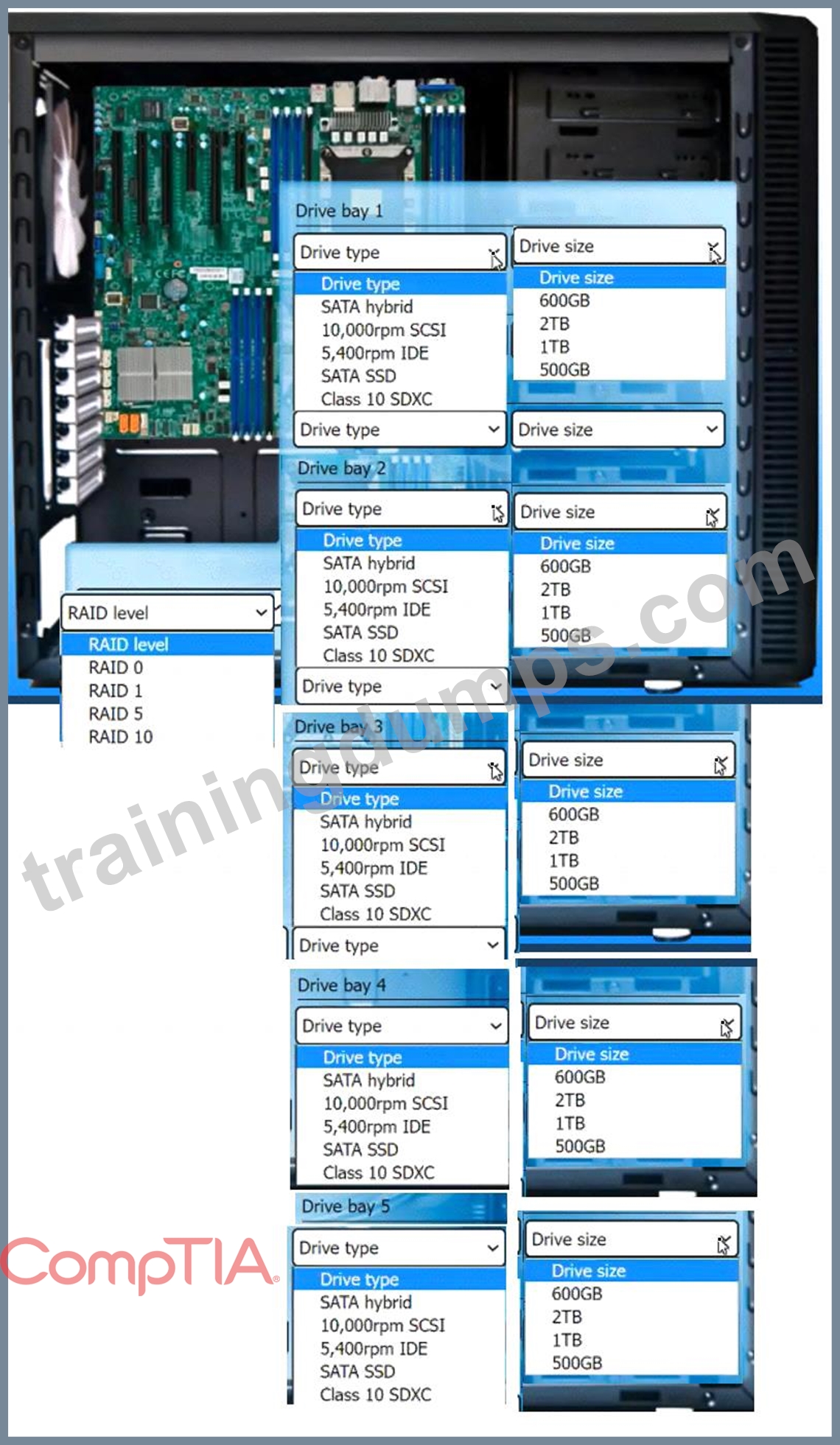
A technician is setting up a video-editing workstation and the operating system is already installed on an internal M.2 drive.
The new workstation must meet the following requirements:
. Be able to edit files at the fastest speed
. Allow for disk failure without any downtime
Have 2TB of usable space
. Ensure the most robust fault tolerance
INSTRUCTIONS
Use the drop-down menus to select the appropriate RAID level, drive types, and drive sizes based on the requirements above. For each drive type that is selected, a corresponding drive size must also be selected.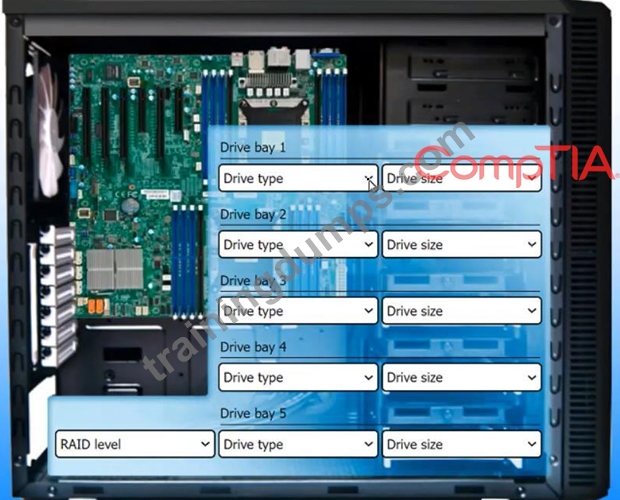
Answer:
Explanation: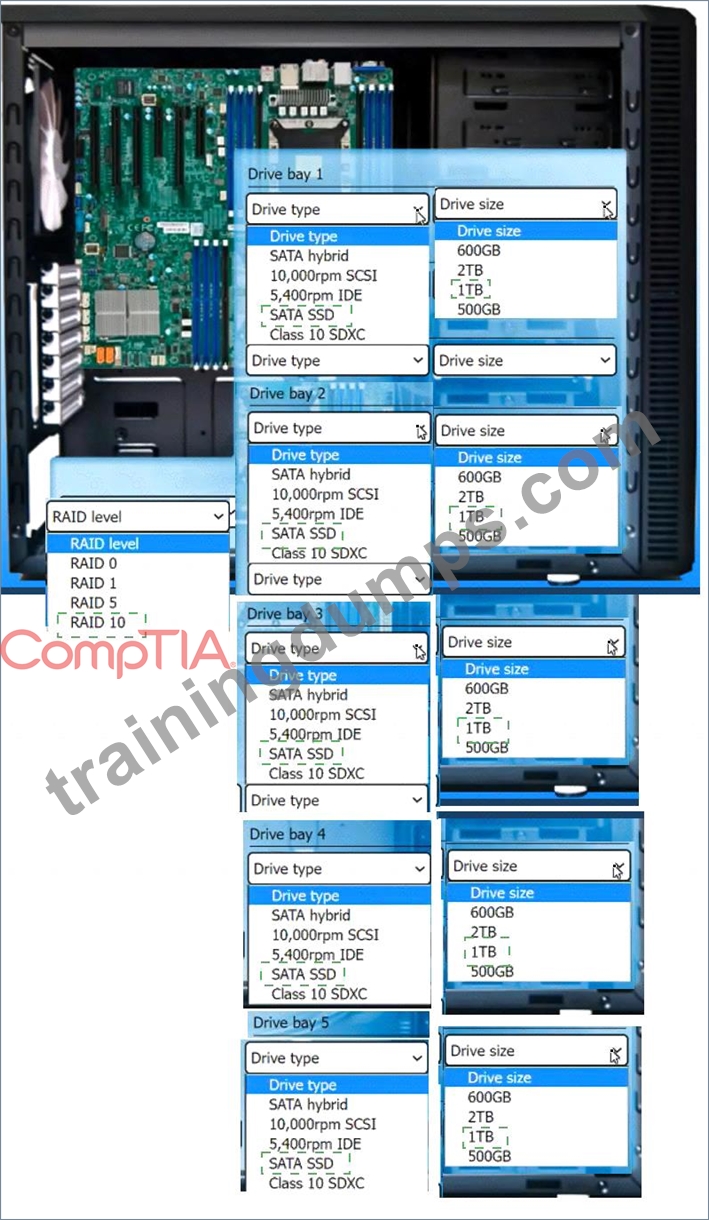
Explanation
Based on the requirements, the best option for the video-editing workstation is to use RAID 10 with four SATA SSDs of 1TB each. This configuration will meet the following requirements:
Be able to edit files at the fastest speed: RAID 10 combines the advantages of RAID 0 and RAID 1, which are striping and mirroring, respectively. Striping can increase the data transfer rate by using multiple disks in parallel, while mirroring can provide redundancy and reliability by duplicating the data on another set of disks. SATA SSDs are also faster than HDDs or SSHDs, as they use flash memory instead of spinning disks, and they can offer lower latency, higher IOPS, and less noise and heat.
Allow for disk failure without any downtime: RAID 10 can withstand up to two disk failures, as long as they are not in the same mirrored pair. If one disk fails, the data can be read from or written to the other disk in the same pair, without affecting the performance or availability of the array. The failed disk can be replaced and rebuilt without interrupting the operation of the workstation.
Have 2TB of usable space: RAID 10 uses half of the total disk capacity for mirroring, so the usable space is equal to the size of two disks. By using four SATA SSDs of 1TB each, the total disk capacity is
4TB, and the usable space is 2TB, which meets the requirement.
Ensure the most robust fault tolerance: RAID 10 offers the highest level of fault tolerance among the standard RAID levels, as it can survive multiple disk failures and provide fast recovery. RAID 10 also has a low overhead, as it does not use parity or checksums, which can slow down the write performance or increase the complexity of the array.
Therefore, the technician should select the following options from the drop-down menus:
RAID level: RAID 10
Drive type 1: SATA SSD
Drive size 1: 1TB
Drive type 2: SATA SSD
Drive size 2: 1TB
Drive type 3: SATA SSD
Drive size 3: 1TB
Drive type 4: SATA SSD
Drive size 4: 1TB
Drive type 5: SATA SSD
Drive size 5: 1TB
NEW QUESTION # 325
......
Prepare Important Exam with 220-1101 Exam Dumps: https://www.trainingdumps.com/220-1101_exam-valid-dumps.html
Pass Exam Questions Efficiently With 220-1101 Questions: https://drive.google.com/open?id=1h0olXTvdkvtQtHGlkfYnYyOZtXV7giKZ
