

The Best Microsoft DP-800 Study Guides and Dumps of 2026
Top Microsoft DP-800 Exam Audio Study Guide! Practice Questions Edition
NEW QUESTION # 68
You are creating a table that will store customer profiles.
You have the following Transact-SQL code.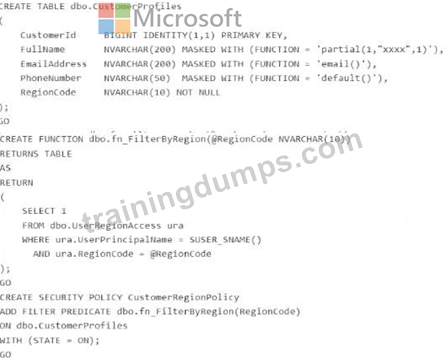
For each of the following statements, select Yes if the statement is true. Otherwise, select No. NOTE: Each correct selection Is worth one point.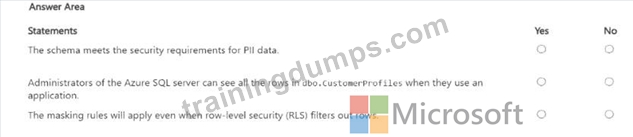
Answer:
Explanation: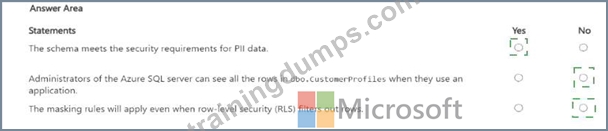
Explanation:
* The schema meets the security requirements for PII data. # Yes
* Administrators of the Azure SQL server can see all the rows in dbo.CustomerProfiles when they use an application. # No
* The masking rules will apply even when row-level security (RLS) filters out rows. # No The first statement is Yes because the design combines two relevant SQL security controls for personally identifiable information: Dynamic Data Masking (DDM) on sensitive columns such as FullName, EmailAddress, and PhoneNumber, and Row-Level Security (RLS) to restrict which rows a user can access based on RegionCode. Microsoft documents that DDM limits sensitive data exposure for nonprivileged users
, while RLS restricts row access according to the user executing the query. Together, these are valid and appropriate controls for protecting PII in Azure SQL Database.
The second statement is No . Administrative users can view unmasked data because administrative roles effectively have CONTROL, which includes UNMASK. However, that does not mean they automatically see all rows through the application query path defined by the RLS policy. The security policy filters rows based on SUSER_SNAME() and matching RegionCode, so row visibility is governed by the predicate unless the policy is altered or bypassed administratively. DDM and RLS solve different problems: DDM affects how returned values are shown, while RLS affects which rows are returned at all.
The third statement is No because masking only applies to data that is actually returned in the query result set.
Microsoft describes DDM as hiding sensitive data in the result set of a query . If RLS filters a row out, that row is not returned, so there is nothing left for masking to act on. In other words, RLS eliminates inaccessible rows first from the user's perspective, and DDM masks sensitive column values only on rows the user is allowed to see.
NEW QUESTION # 69
You have an Azure SQL database that supports a customer-facing API. The API calls a stored procedure named dbo.GetCustomerOrders thousands of times per hour.
After a deployment that updated indexes and statistics, users report that the API endpoint backed by dbo.GetCustomerOrders is slower. In Query Store, the same query now has two persisted execution plans. During the last hour, the newer plan had a significantly higher average duration and CPU time than the older plan.
You need to restore the previous performance quickly, without changing the API code.
Which Transact-SQL command should you run?
- A. ALTER DATABASE
- B. EXEC sys.sp_query_store_set_hints
- C. EXEC sp_query_store_force_plan
- D. DBCC FREEPROCCACHE
Answer: C
Explanation:
We have encountered plan regression. This often happens after maintenance (like updating statistics) because the query optimizer generates a new execution plan that it thinks is better based on the new data distribution, but it ends up being less efficient in practice.
Since you've already identified the Plan ID for the faster plan and the Query ID from Query Store, you can force the "good" plan immediately using:
EXEC sp_query_store_force_plan @query_id = [YourQueryID], @plan_id = [YourFastPlanID]; Use code with caution.
This tells Azure SQL to ignore the new, slower plan and stick to the one that worked, providing an almost instant fix for your API's performance without requiring a code deployment.
Reference:
https://daxsws.com/blog/real-world-dynamics-365-performance-tuning-scenarios-and-fixes
NEW QUESTION # 70
You have an Azure SQL database named SalesDB on a logical server named sales-sql01.
You have an Azure App Service web app named OrderApi that connects to SalesDB by using SQL authentication.
You enable a user-assigned managed identity named OrderApi-Id for OrderApi.
You need to configure OrderApi to connect to SalesDB by using Microsoft Entra authentication. The managed identity must have read and write permissions to SalesDB.
Which Transact-SQL statements should you run in SalesDB?
- A. CREATE USER [OrderApi-Id] FROM EXTERNAL PROVIDER;
ALTER ROLE db_datareader ADD MEMBER [OrderApi-Id];
ALTER ROLE db_datawriter ADD MEMBER [OrderApi-Id]; - B. CREATE LOGIN [OrderApi-Id] WITH PASSWORD = ' P@ssw0rd! ' ;
ALTER SERVER ROLE sysadmin ADD MEMBER [OrderApi-Id]; - C. CREATE USER [OrderApi-Id] WITH PASSWORD = ' P@ssw0rd! ' ;
ALTER ROLE db_datareader ADD MEMBER [OrderApi-Id];
ALTER ROLE db_datawriter ADD MEMBER [OrderApi-Id]; - D. CREATE LOGIN [OrderApi-Id] FROM EXTERNAL PROVIDER;
ALTER ROLE db_datareader ADD MEMBER [OrderApi-Id];
ALTER ROLE db_datawriter ADD MEMBER [OrderApi-Id];
Answer: A
Explanation:
For an Azure App Service using a user-assigned managed identity to connect to Azure SQL Database with Microsoft Entra authentication , the required database-side step is to create a database user from the external provider , then grant the needed database roles. Microsoft's Azure SQL documentation for managed identities states that to let a managed identity access the target database, you create a SQL user for that identity by using:
CREATE USER [ < identity-name > ] FROM EXTERNAL PROVIDER;
and then assign the appropriate roles.
That makes db_datareader and db_datawriter the right role grants here, because the requirement says the identity must have read and write permissions to SalesDB.
The other options are incorrect:
* A uses CREATE LOGIN ... FROM EXTERNAL PROVIDER, which is not the right choice for this Azure SQL Database scenario; the documented pattern is to create a database user from the external provider.
* B and D create SQL-authentication principals with passwords, which does not meet the Microsoft Entra managed-identity requirement.
* D also grants sysadmin, which is a server-level overgrant and not appropriate for the stated read/write requirement.
NEW QUESTION # 71
You have an Azure SQL database that supports the OLTP workload of an order-processing application.
During a 10-minute incident window, you run a dynamic management view query and discover the following:
Session 72 is sleeping with open_transaction_count = 1.
Multiple other sessions show blocking_session_id = 72 in sys.dm_exec_requests.
sys.dm_exec_input_buffer(72, NULL) returns only BEGIN TRANSACTION UPDATE Sales.Orders.
Users report that updates to Sales.Orders intermittently time out during the incident window. The timeouts stop only after you manually terminate session 72.
What is a possible cause of the blocking?
- A. An explicit transaction was started but not committed or rolled back.
- B. A long-running SELECT statement is blocking writers.
- C. Session 72 caused a deadlock.
- D. A lock escalation occurred.
Answer: A
Explanation:
The best explanation is an open explicit transaction . During the incident, session 72 was sleeping but still had open_transaction_count = 1 , and sys.dm_exec_input_buffer(72, NULL) showed only BEGIN TRANSACTION UPDATE Sales.Orders. That pattern indicates the session executed an update inside an explicit transaction and then remained idle without committing or rolling back , while still holding locks.
Other sessions showing blocking_session_id = 72 is the expected symptom of that situation. Microsoft explains that blocking occurs when one session holds a lock on a resource and another session requests a conflicting lock, and sleeping sessions can continue to block if they retain locks through an open transaction.
This also fits the observed behavior that the timeouts stopped only after session 72 was terminated . Killing the session would roll back the active transaction and release the locks, allowing waiting updates to continue.
That is much more consistent with an uncommitted transaction than with a deadlock, because deadlocks are normally detected and one session is chosen as the victim automatically rather than persisting until manual termination.
NEW QUESTION # 72
Hotspot Question
You have an Azure SQL managed instance that supports a gaming leaderboard API and contains a table named dbo.Leaderboard.
You plan to reduce write latency during peak events of dbo.Leaderboard.
You need to ensure that dbo.Leaderboard supports point lookups. The leaderboard information does NOT need to persist after a restart.
Which type of table and index should you configure? To answer, select the appropriate options in the answer area.
NOTE: Each correct selection is worth one point.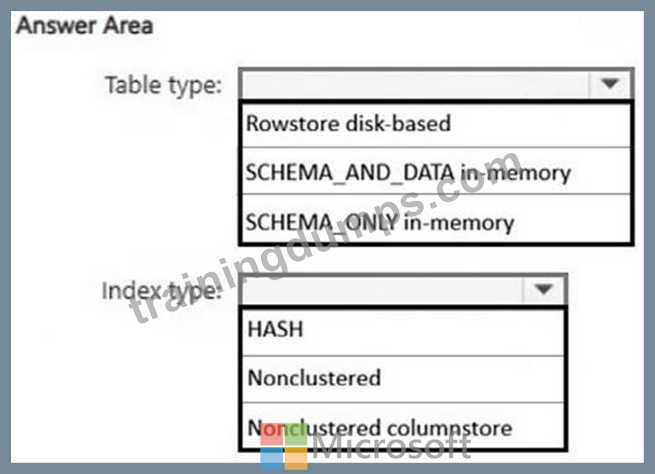
Answer:
Explanation: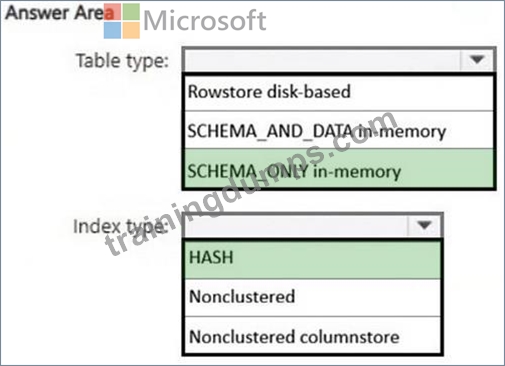
NEW QUESTION # 73
You are developing an Azure SQL solution by using Microsoft Visual Studio 2026. The solution uses a GitHub repository.
You plan to use GitHub Copilot Chat to access the GitHub repository tools by connecting to the GitHub MCP Server.
You need to configure Visual Studio to support the planned configuration. The solution must rely on OAuth to access the MCP server.
What should you create?
- A. the <SOLUTIONDIR>\.vs\settings.json file that contains the personal access token (PAT) that has the repo scope
- B. the <SOLUTIONDIR>\.github\mcp.json file that contains the personal access token (PAT) that has the repo scope
- C. the <SOLUTIONDIR>\.vscode\settings.json file that contains a URL of
https://api.githubcopilot.com/mcp/ - D. the <SOLUTIONDIR>\.mcp.json file that contains a URL of https://api.githubcopilot.com/mcp/
Answer: D
Explanation:
In this scenario, you need to create an mcp.json file. This file acts as the configuration bridge that tells Visual Studio 2026 and GitHub Copilot Chat how to connect to and communicate with the GitHub MCP Server.
Key Configuration Details
The mcp.json file is typically placed in your solution's root directory or a specific .mcp folder to enable project-specific tools Configuration Steps
1. Create the MCP Configuration File
You must define the connection to the GitHub MCP server so Copilot Chat can interact with your repository tools.
File Name: mcp.json
Location: Usually placed in %AppData%\Microsoft\VisualStudio\2026\mcp.json (or the project root depending on your specific extension settings).
Content:
{
"mcpServers": {
"github": {
"url": "https://api.githubcopilot.com/mcp/",
"auth": "OAuth"
}
}
}
2. Authenticate via OAuth
3. Connect Azure SQL in VS 2026
Reference:
https://www.workato.com/the-connector/mcp-server-tutorial/
NEW QUESTION # 74
Drag and Drop Question
You have a SQL database in Microsoft Fabric that contains a table named WebSite.Logs.
WebSite.Logs stores application telemetry data. WebSite.Logs contains a nvarchar (max) column named log that stores JSON documents.
You have a daily report that filters by the $.severity JSON property and returns LogId, LogDateTime, and log. The report frequently causes full table scans.
You need to modify WebSite.Logs to support efficient filtering by $.severity and avoid key lookups for the columns returned by the report.
How should you complete the Transact-SQL code to avoid full table scans? To answer, drag the appropriate values to the correct targets. Each value may be used once, more than once, or not at all. You may need to drag the split bar between panes or scroll to view content.
NOTE: Each correct selection is worth one point.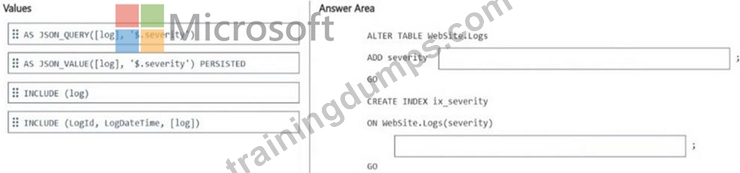
Answer:
Explanation: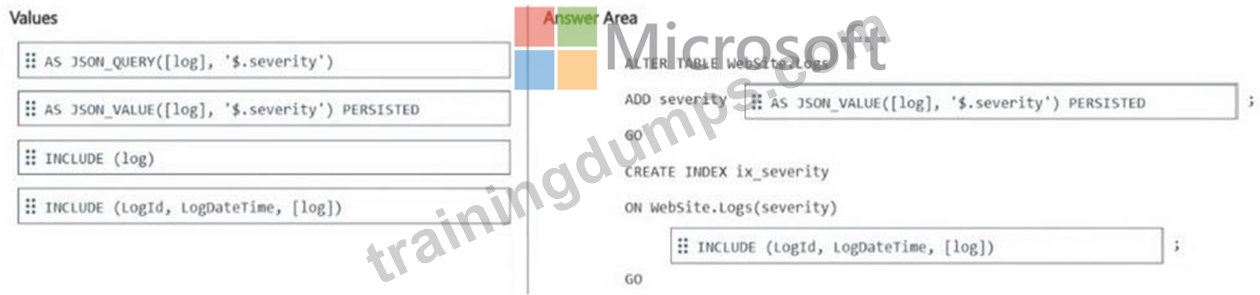
NEW QUESTION # 75
Case Study 1 - Contoso
Existing Environment
Azure Environment
Contoso has an Azure subscription in North Europe that contains the corporate infrastructure.
The current infrastructure contains a Microsoft SQL Server 2017 database. The database contains the following tables.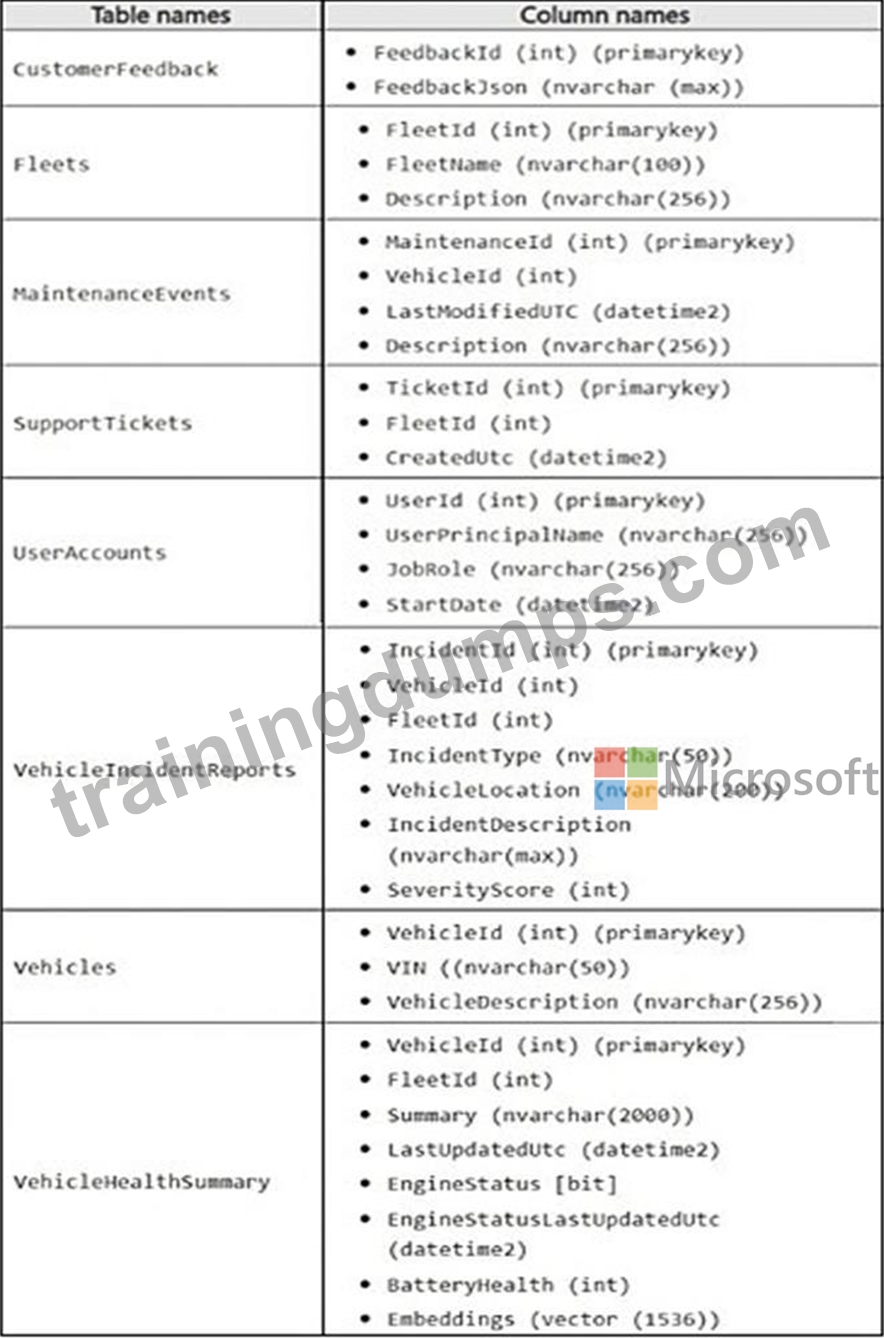
The FeedbackJsoncolumn has a full-text index and stores JSON documents in the following format.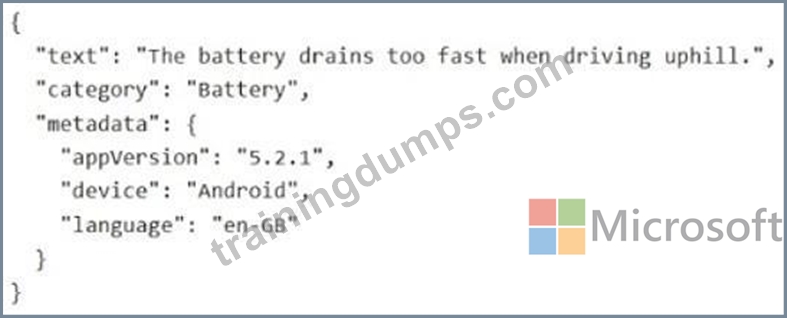
The support staff at Contoso never has the UNMASKpermission.
Problem Statements
Contoso is deploying a new Azure SQL database that will become the authoritative data store for the following:
* AI workloads
* Vector search
* Modernized API access
* Retrieval Augmented Generation (RAG) pipelines
Sometimes the ingestion pipeline fails due to malformed JSON and duplicate payloads.
The engineers at Contoso report that the following dashboard query runs slowly.
You review the execution plan and discover that the plan shows a clustered index scan.
VehicleIncidentReportsoften contains details about the weather, traffic conditions, and location. Analysts report that it is difficult to find similar incidents based on these details.
Requirements
Planned Changes
Contoso wants to modernize Fleet Intelligence Platform to support AI-powered semantic search over incident reports.
Security Requirements
Contoso identifies the following security requirements:
* Restrict the support staff from viewing Personally Identifiable Information (PII) data, which is full email addresses and phone numbers.
* Enforce row-level filtering so that analysts see only incidents for the fleets to which they are assigned. The analysts can be assigned to multiple fleets.
Database Performance and Requirements
Contoso identifies the following telemetry requirements:
* Telemetry data must be stored in a partitioned table.
* Telemetry data must provide predictable performance for ingestion and retention operations.
* latitude, longitude, and accuracyJSON properties must be filtered by using an index seek.
Contoso identifies the following maintenance data requirements:
* Ensure that any changes to a row in the MaintenanceEventstable updates the corresponding value in the LastModifiedUtccolumn to the time of the change.
* Avoid recursive updates.
AI Search, Embeddings, and Vector Indexing
Contoso plans to implement semantic search over incident data to meet the following requirements:
* Embeddings must be stored in dedicated Azure SQL Database tables.
* Embeddings must be generated from rich natural language fields.
* Chunking must preserve semantic coherence.
* Hybrid search must combine the following:
- Vector similarity
- Keyword filtering or boosting
Development Requirements
The development team at Contoso will use Microsoft Visual Studio Code and GitHub Copilot and will retrieve live metadata from the databases.
Contoso identifies the following requirements for querying data in the FeedbackJsoncolumn of the CustomerFeedbacktable:
* Extract the customer feedback text from the JSON document.
* Filter rows where the JSON text contains a keyword.
* Calculate a fuzzy similarity score between the feedback text and a known issue description.
* Order the results by similarity score, with the highest score first.
You need to enable similarity search to provide the analysts with the ability to retrieve the most relevant health summary reports. The solution must minimize latency. What should you include in the solution?
- A. a vector index on the Embeddings (vector (1536)) column
- B. a full-text index on the Embeddings (vector (1536)) column
- C. a standard nonclustered index on the Embeddings (vector (1536)) column
- D. a computed column that manually compares vector values
Answer: A
Explanation:
Scenario: There is a VehicleHealthSummary table.
To enable similarity search on your health summary data while minimizing latency, you should use the native VECTOR data type and a DiskANN vector index, which are now available in public preview for Azure SQL Database.
Solution Implementation
1. Define the Vector Column: Ensure your embeddings are stored using the native VECTOR(1536) type rather than NVARCHAR or VARBINARY. This format is optimized for high- dimensional data and mathematical operations.
ALTER TABLE HealthSummaries
ADD SummaryVector VECTOR(1536);
2. Create the Vector Index: Use the CREATE VECTOR INDEX statement. In Azure SQL, this uses the DiskANN algorithm, which is specifically designed to provide high-speed Approximate Nearest Neighbor (ANN) searches for large datasets.
CREATE VECTOR INDEX idx_health_summary_vector
ON HealthSummaries (SummaryVector)
WITH ( METRIC = 'COSINE', TYPE = 'DISKANN' );
3. Perform the Similarity Search: To leverage the index for low-latency retrieval, use the VECTOR_SEARCH function rather than VECTOR_DISTANCE. While VECTOR_DISTANCE calculates exact values (resulting in a full table scan), VECTOR_SEARCH utilizes the DiskANN index to find the most relevant reports quickly.
SELECT TOP(10) *
FROM HealthSummaries
ORDER BY VECTOR_DISTANCE('cosine', SummaryVector, @query_vector);
Reference:
https://learn.microsoft.com/en-us/samples/azure-samples/azure-sql-db-openai/azure-sql-db- openai/
NEW QUESTION # 76
You have a GitHub Enterprise subscription.
Your team is developing an Azure SQL dataset solution from a locally cloned GitHub repository by using Microsoft Visual Studio Code and GitHub Copilot Chat.
A mix of GitHub Copilot instructions is configured at different levels, including organization-wide, repository-wide, agent-specific, and personal.
Which instructions will take precedence over the others?
- A. agent-specific
- B. repository-wide
- C. organization-wide
- D. personal
Answer: D
Explanation:
In a GitHub Enterprise environment, personal instructions (user-level) generally have the highest precedence for individual interactions in VS Code.
Order of Precedence
When GitHub Copilot processes instructions, it follows a "specific-to-general" hierarchy. The most specific context (the individual user) typically overrides broader organizational settings.
1. Personal Instructions
Set via .github/copilot-instructions.md in your local home directory or VS Code settings.
Overrides all other layers for your specific session.
2. Agent-Specific / Extension Instructions
Specific instructions provided to a custom agent (like @workspace or a custom Chat participant).
3. Repository-wide Instructions
Stored in the .github/copilot-instructions.md file within the specific repository.
4. Organization-wide Policies
Set by Enterprise/Org admins. These usually act as "guardrails" (e.g., blocking suggestions) rather than stylistic instructions.
Reference:
https://aiddbot.com/vscode-and-github-copilot
NEW QUESTION # 77
Note: This question is part of a series of questions that present the same scenario. Each question in the series contains a unique solution that might meet the stated goals. Some question sets might have more than one correct solution, while others might not have a correct solution.
After you answer a question in this section, you will NOT be able to return to it. As a result, these questions will not appear in the review screen.
You have a SQL database in Microsoft Fabric that contains a table named dbo.Orders.
dbo.Orders has a clustered index, contains three years of data, and is partitioned by a column named OrderDate by month.
You need to remove all the rows for the oldest month. The solution must minimize the impact on other queries that access the data in dbo.Orders.
Solution: Run the following Transact-SQL statement.
DELETE FROM dbo.Orders
WHERE OrderDate < DATEADD(month, -36, SYSUTCDATETIME());
Does this meet the goal?
- A. No
- B. Yes
Answer: A
Explanation:
Correct:
* Identify the partition number for the oldest month, and then run the following Transact-SQL statement.
TRUNCATE TABLE dbo.Orders
WITH (PARTITIONS (partition number));
The best Transact-SQL statement to remove all rows for the oldest month while minimizing the impact on other queries is TRUNCATE TABLE with a WITH (PARTITIONS (...)) clause.
Why TRUNCATE TABLE ... WITH (PARTITIONS (...)) is Best
Efficiency: TRUNCATE TABLE is a Data Definition Language (DDL) operation that removes data by deallocating the data pages, which is a metadata operation and is very fast, regardless of the amount of data in the partition.
Minimal Logging: It uses less transaction log space compared to a DELETE statement, which logs each row deletion individually.
Low Impact on Concurrency: It performs a quick, partition-specific operation. A row-by-row DELETE would be a long-running transaction and could cause locking and blocking issues for other queries accessing the table.
Data Integrity: Because the table has a clustered index and is partitioned by the same column (aligned indexes), the TRUNCATE PARTITION operation is a fast, partition-level maintenance operation that targets only that specific data subset.
Incorrect:
* : Identify the partition scheme for the oldest month, and then run the following Transact-SQL statement.
ALTER TABLE dbo.Orders
DROP PARTITION SCHEME (partition_scheme_name);
The DROP PARTITION SCHEME statement removes the partition scheme object from the database but does not remove the data itself or free up the space, and it requires all tables to be moved off the scheme first, which is a complex operation. This does not meet the goal of removing the data efficiently.
* Run the following Transact-SQL statement.
DELETE FROM dbo.Orders
WHERE OrderDate < DATEADD(month, -36, SYSUTCDATETIME());
A standard DELETE statement, even with a WHERE clause that uses the partition column, can be a time-consuming, logged operation that causes locking and blocking on the main table, negatively impacting performance.
Reference:
https://stackoverflow.com/questions/63632963/truncate-partition-vs-drop-partition-performace- wise-which-one-is-efficient-an
NEW QUESTION # 78
You have an Azure SQL database that contains the following tables and columns.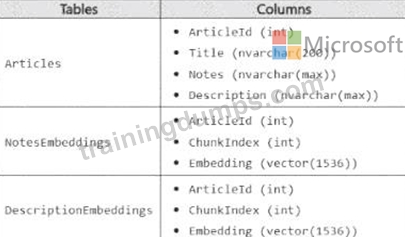
Embeddings in the NotesEnbeddings and DescriptionEabeddings tables have been generated from values in the Description and notes columns of the Articles table by using different chunk sizes.
You need to perform approximate nearest neighbor (ANN) queries across both embedding tables. The solution must minimize the impact of using different chunk sizes.
What should you use? To answer, select the appropriate options in the answer area.
NOTE: Each correct selection is worth one point.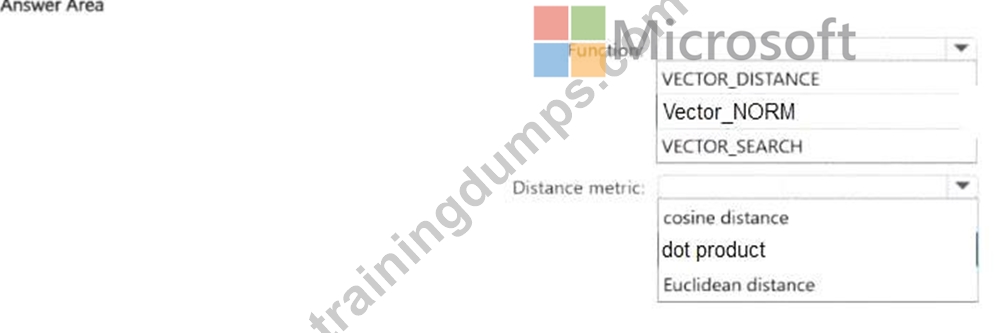
Answer:
Explanation: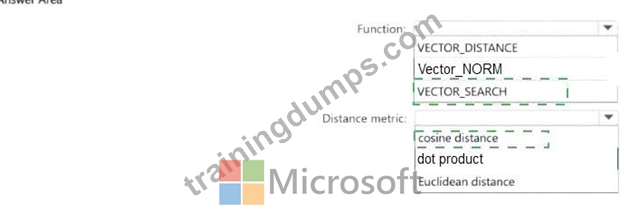
Explanation:
The correct function is VECTOR_SEARCH because the requirement is to perform approximate nearest neighbor (ANN) queries. Microsoft's SQL documentation states that VECTOR_SEARCH is the function used for vector similarity search, and that an ANN index is used only with VECTOR_SEARCH when a compatible vector index exists on the target column. By contrast, VECTOR_DISTANCE calculates an exact distance and does not use a vector index for ANN retrieval.
The correct distance metric is cosine distance. Microsoft documents that VECTOR_SEARCH supports cosine, dot, and euclidean metrics, and Microsoft guidance specifically notes that cosine similarity is commonly used for text embeddings. It also states that retrieval of the most similar texts to a given text typically functions better with cosine similarity, and that Azure OpenAI embeddings rely on cosine similarity to compute similarity between a query and documents. Since both NotesEmbeddings and DescriptionEmbeddings are text-derived embeddings and the goal is to minimize the impact of different chunk sizes, cosine is the best choice because it compares direction/angle rather than being as sensitive to vector magnitude as Euclidean distance.
NEW QUESTION # 79
Case Study 2 - Fabrikam
Existing Environment
Azure Environment
Fabrikam has a single Azure subscription in the East US 2 Azure region. The subscription contains an Azure SQL database named DB1. DB1 contains the following tables:
* Patients
* Employees
* Procedures
* Transactions
* UsefulPrompts
* ProcedureDocuments
You store a column master key as a secret in Azure Key Vault.
You have an on-premises application named TransactionProcessing that uses a hard-coded username and password in a connection string to access DB1.
Problem Statements
Users report that after executing a long-running stored procedure named sp_UpdateProcedureForPatient, updates to the underlying data are sometimes inconsistent.
Requirements
Planned Changes
Fabrikam plans to manage all changes to Azure SQL Database objects by using source control in GitHub. Every pull request submitted to production will be validated before it can be merged.
Deployments must use the Release configuration.
Security Requirements
Fabrikam identifies the following security requirements:
* The TransactionProcessing application must use a passwordless connection to DB1.
* The Employees table contains two columns named TaxID and Salary that must be encrypted at rest.
* Auditors must have a tamper-evident history of transactions with cryptographic proof of changes to the employee data.
Database Performance Requirements
Records accessed by using sp_UpdateProcedureForPatient must NOT be changed by other transactions while the stored procedure runs.
AI Search, Embeddings, and Vector Indexing
Fabrikam identifies the following AI-related requirements:
* Queries to the ProcedureDocuments table must use Reciprocal Rank Fusion (RRF).
* Users must be able to query the data in DB1 by using prompts in Copilot in Microsoft Fabric.
* The UsefulPrompts table will store prompts that doctors can use to help diagnose patient illness by connecting to an Azure OpenAI endpoint.
Development Requirements
Fabrikam identifies the following development requirements:
* Provide the functionality to retrieve all the transactions of a given patient between two dates, showing a running total.
* Expose a Data API builder (DAB) configuration file to enable Azure services to perform the following operations over a REST API:
- Read data from the procedures table without authentication.
- Read and insert data into the Transactions table once authenticated.
- Execute the sp_UpdateProcedurePatient stored procedure.
* Provide the functionality to retrieve a list of the names of patients who underwent medical procedures during the last 30 days.
* Information for each medical procedure will be stored in a table. The table will be used with a large language model (LLM) for user querying and will have the following structure.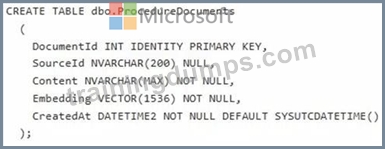
DAB
You create a DAB configuration file that meets the development requirements for DB1 and includes the following entities.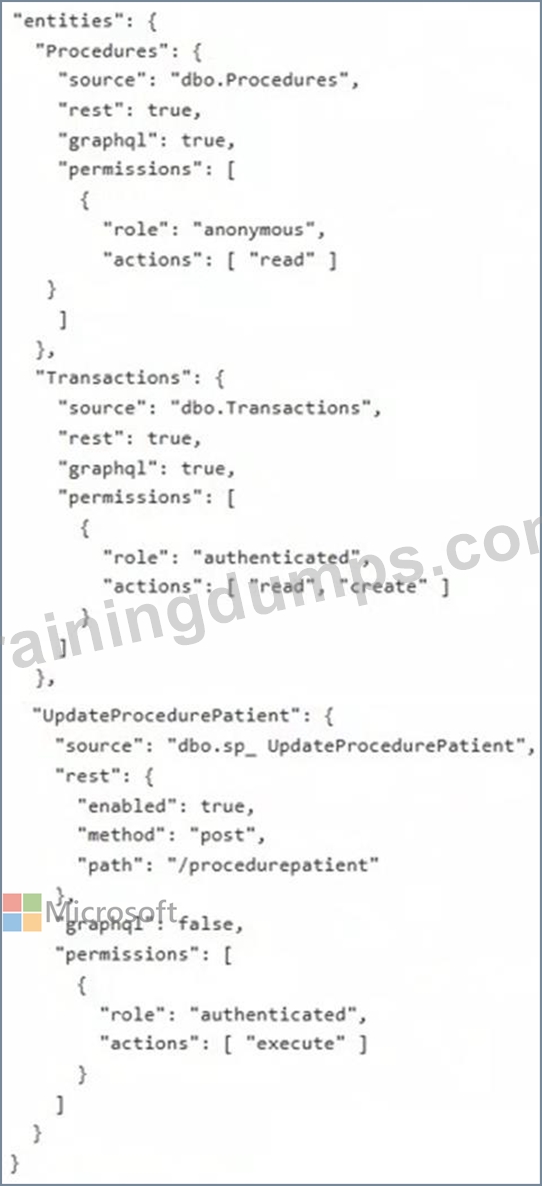
Hotspot Question
You need to create a solution that meets the development requirements for retrieving the patient lists.
How should you complete the Transact-SQL code? To answer, select the appropriate options in the answer area.
NOTE: Each correct selection is worth one point.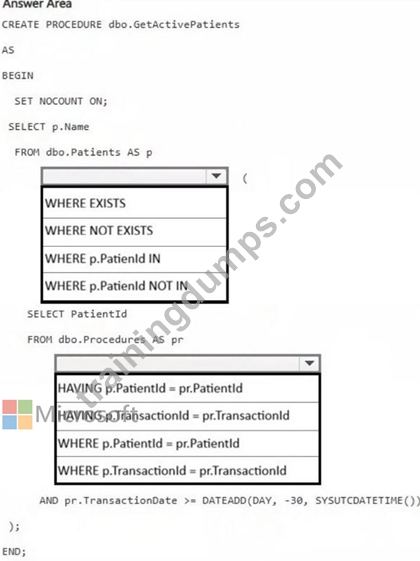
Answer:
Explanation: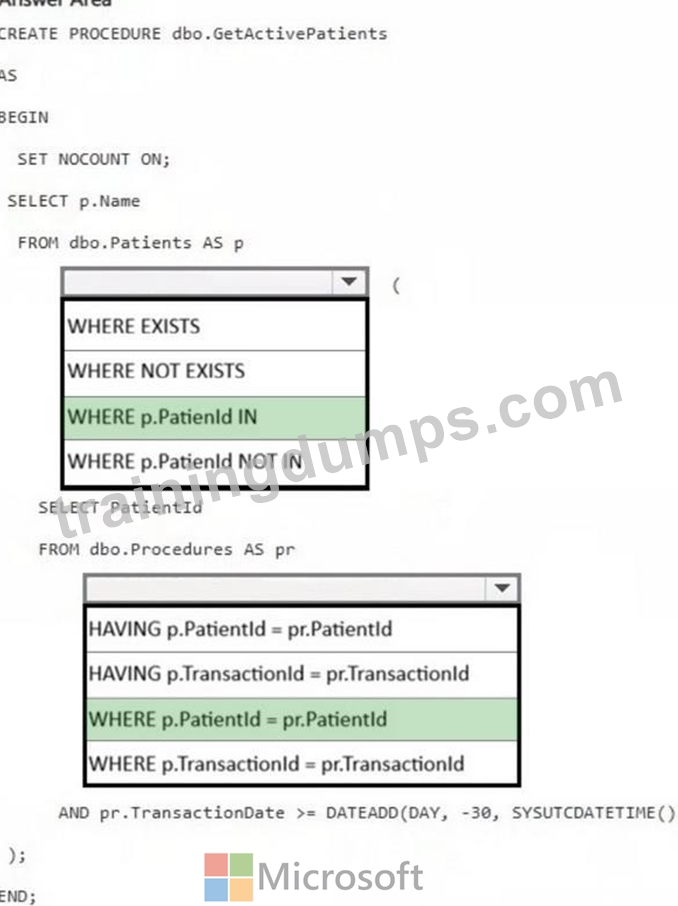
NEW QUESTION # 80
You have an Azure SQL database named SalesDB and an Azure App Service app named sales- api. SalesDB contains a table named dbo.Customers. dbo.Customers contains two columns named CreditCardNumber and TenantId.
Currently, sales-api connects to SalesDB by using SQL authentication with stored username and password.
You need to recommend a solution that meets the following requirements:
- Provides a passwordless method for sales-api to access SalesDB.
- Ensures that credit card numbers are NOT stored as plain text.
What should you include in the recommendation?
- A. Transparent Data Encryption (TDE) and row-level security (RLS)
- B. managed identities and Always Encrypted
- C. Azure Key Vault and Always Encrypted
- D. managed identities and dynamic data masking
Answer: B
Explanation:
To move from SQL authentication to a more secure, passwordless architecture while protecting credit card data, you should implement Azure Managed Identities for authentication and Always Encrypted for data protection.
1. Enable Passwordless Authentication
Replace your stored username and password with a Managed Identity. This allows the App Service to authenticate with the database using its own identity, managed by Azure.
Step 1A: Enable Identity on App Service
Step 1B: Grant Database Access
Set an Entra ID (Active Directory) Admin for your SQL Server.
Connect to your database as that admin and run the following to create a user for your app:
Step 1C: Update Connection String
2. Protect Credit Card Numbers
Use Always Encrypted to ensure credit card numbers are encrypted before they even reach the database. The database engine never sees the plain text.
Step 2A: Store Encryption Keys
Step 2B: Encrypt the Column
Use the Always Encrypted Wizard in SQL Server Management Studio (SSMS).
Select the credit card column and choose Randomized encryption for maximum security (unless you need to search by exact matches, in which case use Deterministic).
Reference:
https://learn.microsoft.com/en-us/sql/relational-databases/security/encryption/always-encrypted- database-engine
NEW QUESTION # 81
Hotspot Question
You have a database named db1. The schema is stored in a Git repository as an SDK-style SQL database project. The repository contains the following GitHub Action workflow.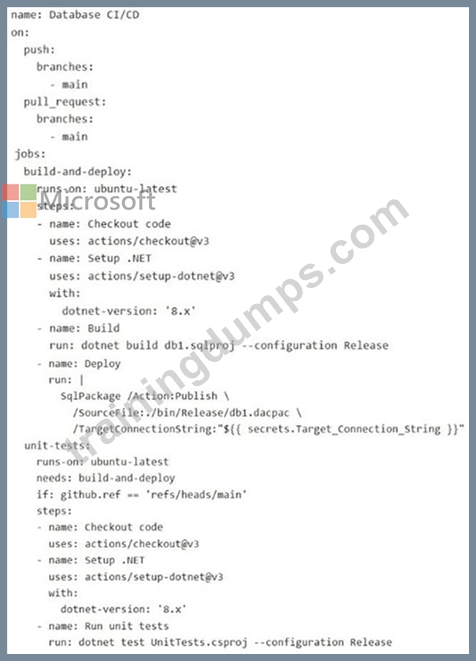
For each of the following statements, select Yes if the statement is true. Otherwise, select No.
NOTE: Each correct selection is worth one point.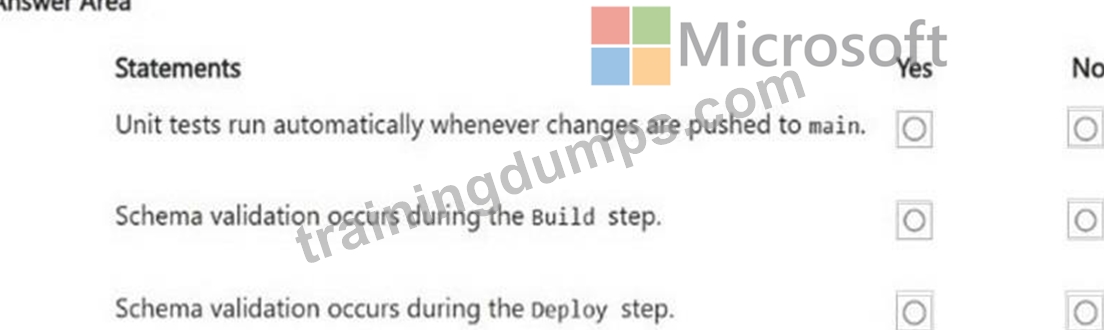
Answer:
Explanation: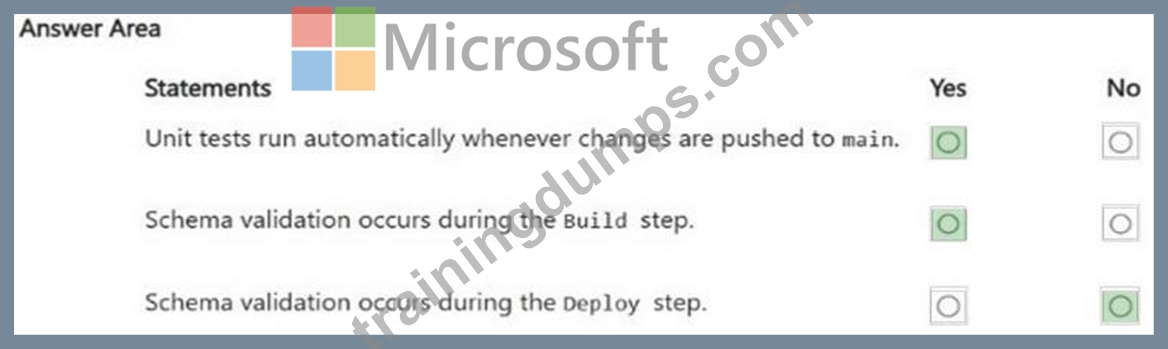
NEW QUESTION # 82
Case Study 2 - Fabrikam
Existing Environment
Azure Environment
Fabrikam has a single Azure subscription in the East US 2 Azure region. The subscription contains an Azure SQL database named DB1. DB1 contains the following tables:
* Patients
* Employees
* Procedures
* Transactions
* UsefulPrompts
* ProcedureDocuments
You store a column master key as a secret in Azure Key Vault.
You have an on-premises application named TransactionProcessing that uses a hard-coded username and password in a connection string to access DB1.
Problem Statements
Users report that after executing a long-running stored procedure named sp_UpdateProcedureForPatient, updates to the underlying data are sometimes inconsistent.
Requirements
Planned Changes
Fabrikam plans to manage all changes to Azure SQL Database objects by using source control in GitHub. Every pull request submitted to production will be validated before it can be merged.
Deployments must use the Release configuration.
Security Requirements
Fabrikam identifies the following security requirements:
* The TransactionProcessing application must use a passwordless connection to DB1.
* The Employees table contains two columns named TaxID and Salary that must be encrypted at rest.
* Auditors must have a tamper-evident history of transactions with cryptographic proof of changes to the employee data.
Database Performance Requirements
Records accessed by using sp_UpdateProcedureForPatient must NOT be changed by other transactions while the stored procedure runs.
AI Search, Embeddings, and Vector Indexing
Fabrikam identifies the following AI-related requirements:
* Queries to the ProcedureDocuments table must use Reciprocal Rank Fusion (RRF).
* Users must be able to query the data in DB1 by using prompts in Copilot in Microsoft Fabric.
* The UsefulPrompts table will store prompts that doctors can use to help diagnose patient illness by connecting to an Azure OpenAI endpoint.
Development Requirements
Fabrikam identifies the following development requirements:
* Provide the functionality to retrieve all the transactions of a given patient between two dates, showing a running total.
* Expose a Data API builder (DAB) configuration file to enable Azure services to perform the following operations over a REST API:
- Read data from the procedures table without authentication.
- Read and insert data into the Transactions table once authenticated.
- Execute the sp_UpdateProcedurePatient stored procedure.
* Provide the functionality to retrieve a list of the names of patients who underwent medical procedures during the last 30 days.
* Information for each medical procedure will be stored in a table. The table will be used with a large language model (LLM) for user querying and will have the following structure.
DAB
You create a DAB configuration file that meets the development requirements for DB1 and includes the following entities.
Hotspot Question
You create an SDK-style SQL database project in Microsoft Visual Studio Code named Database.sqlproj and add the project to a GitHub repository.
You need to configure a GitHub Actions workflow to support the planned changes for DB1.
How should you complete the workflow? To answer, select the appropriate options in the answer area.
NOTE: Each correct selection is worth one point.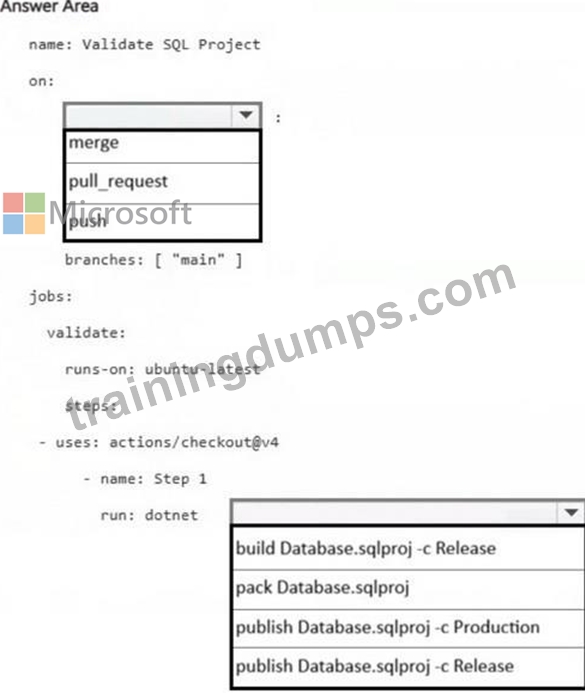
Answer:
Explanation: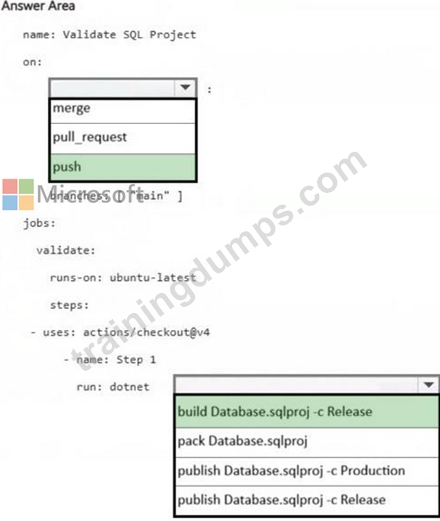
NEW QUESTION # 83
Note: This question is part of a series of questions that present the same scenario. Each question in the series contains a unique solution that might meet the stated goals. Some question sets might have more than one correct solution, while others might not have a correct solution.
After you answer a question in this section, you will NOT be able to return to it. As a result, these questions will not appear in the review screen.
You have an SDK-style SQL database project stored in a Git repository. The project targets an Azure SQL database.
The CI build fails with unresolved reference errors when the project references system objects.
You need to update the SQL database project to ensure that dotnet build validates successfully by including the correct system objects in the database model for Azure SQL Database.
Solution: Build the project by running dotnet build -bl -flp:v=diag.
Does this meet the goal?
- A. No
- B. Yes
Answer: A
Explanation:
Correct:
* Add the Microsoft.SqlServer.Dacpacs.Azure.Master NuGet package to the project.
To resolve system reference errors in an SDK-style SQL project targeting Azure SQL Database, you need to add a reference to the Microsoft.SqlServer.Dacpacs.Azure.Master NuGet package.
In your .sqlproj file, include the following item group:
<ItemGroup>
<PackageReference Include="Microsoft.SqlServer.Dacpacs.Azure.Master" Version="1.60.0" />
</ItemGroup>
Why this works:
System Objects: Standard SDK-style projects don't automatically include system views (like sys.database_principals or sys.dm_db_resource_stats). This package provides the necessary metadata for the compiler.
Azure Specifics: It includes Azure-only system objects that aren't present in the standard master database dacpac used for on-premises SQL Server.
CI/CD Friendly: Since it is a NuGet package, the dotnet build command will automatically restore it during the CI process without requiring manual file paths or local installations of Visual Studio.
Incorrect:
* Add an artifact reference to the Azure SQL Database master.dacpac file.
* Add the Microsoft.SqlServer.Dacpacs.Master NuGet package to the project.
* Build the project by running dotnet build -bl -flp:v=diag.
Reference:
https://learn.microsoft.com/en-us/sql/tools/sql-database-projects/concepts/system-objects
NEW QUESTION # 84
You have an Azure SQL database that stores order data.
A reporting query aggregates monthly revenue per customer runs frequently.
You need to reduce how long it takes to retrieve the calculated values. The solution must NOT alter any underlying table structure.
What should you do?
- A. Create a view by using ORDER BY without TOP, and then create a unique clustered index on the view.
- B. Create a view by using WITH SCHEMABINDING, include COUNT_BIG(*), and then create a unique clustered index on the view.
- C. Create a view without using WITH SCHEMABINDING, and then create a nonclustered index on the view.
- D. Create a view by using GROUP BY, and then create a unique clustered index on the view.
Answer: B
Explanation:
Creating an indexed view using WITH SCHEMABINDING, including COUNT_BIG(*), and creating a unique clustered index is a valid and effective approach to significantly improve the performance of your frequent reporting query without altering the underlying table structure.
This process materializes the aggregated data and stores it physically in the database, so the query optimizer can read from the precomputed view rather than rescanning the base tables every time the query runs.
Reference:
https://learn.microsoft.com/en-us/sql/relational-databases/views/create-indexed-views
NEW QUESTION # 85
You have an Azure SQL database that contains a table named dbo.orders, dbo.orders contains a column named createDate that stores order creation dates.
You need to create a stored procedure that filters Orders by CreateDate for a single calendar day. The solution must be SARGable.
How should you complete the Transact-SQL code? To answer, drag the appropriate values to the correct targets. Each value may be used once, more than once, or not at all. You may need to drag the split bar between panes or scroll to view content.
NOTE: Each correct selection is worth one point.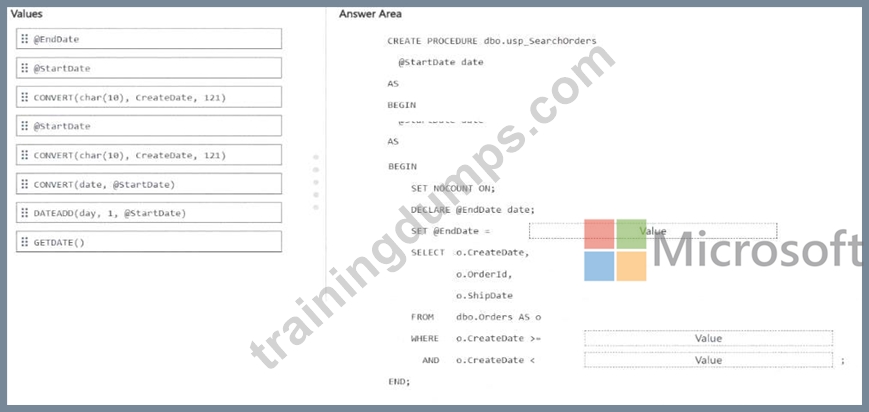
Answer:
Explanation: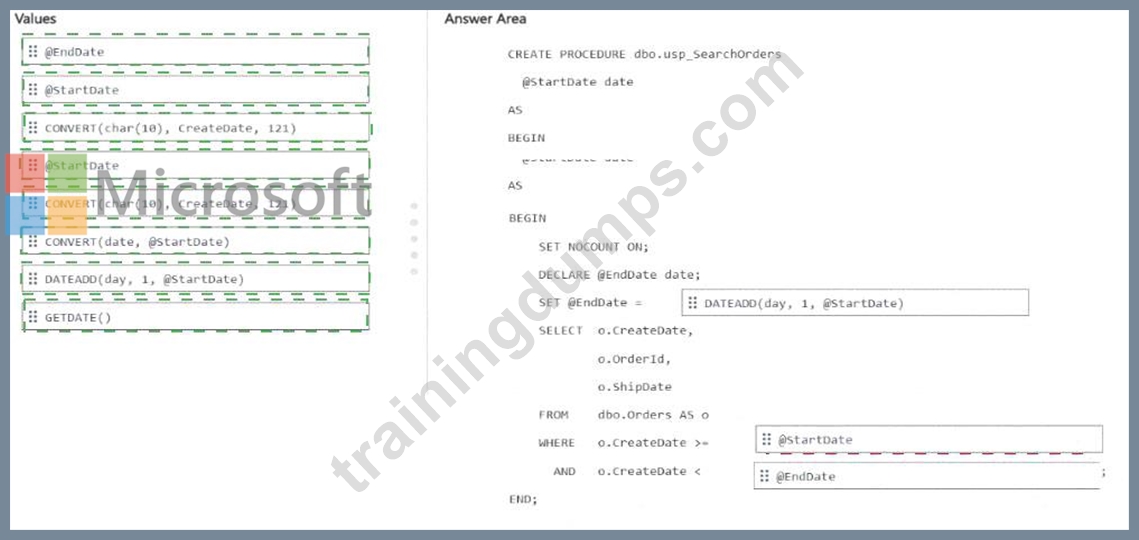
Explanation: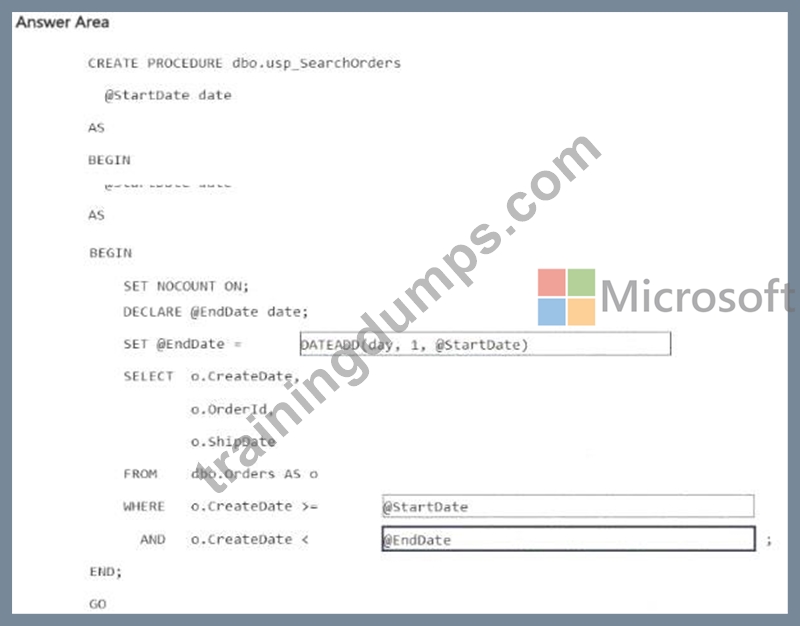
The correct SARGable pattern for filtering a single calendar day is to use a half-open date range :
o.CreateDate > = @StartDate
AND o.CreateDate < @EndDate
with:
SET @EndDate = DATEADD(day, 1, @StartDate)
This is the correct design because it keeps the function off the column and applies it only to the parameter.
That allows SQL Server and Azure SQL to use an index on CreateDate efficiently, which is the key requirement for a SARGable predicate. Microsoft documents DATEADD as the standard function for adding one day to a date value, which makes it the right way to derive the exclusive upper boundary for the next day.
The incorrect choices are the ones that wrap CreateDate in CONVERT(...), because expressions like:
CONVERT(char(10), CreateDate, 121) = ...
make the predicate non-SARGable and typically prevent efficient seeks on an index over CreateDate.
So the completed procedure is:
CREATE PROCEDURE dbo.usp_SearchOrders
@StartDate date
AS
BEGIN
SET NOCOUNT ON;
DECLARE @EndDate date;
SET @EndDate = DATEADD(day, 1, @StartDate);
SELECT o.CreateDate,
o.OrderId,
o.ShipDate
FROM dbo.Orders AS o
WHERE o.CreateDate > = @StartDate
AND o.CreateDate < @EndDate;
END;
NEW QUESTION # 86
Drag and Drop Question
You have an Azure SQL database that supports an AI-driven product search API.
You need to identify the top CPU-consuming queries from the last two hours by using Query Store data. The solution must aggregate CPU consumption across executions and return only the top 15 query hashes.
How should you complete the Transact-SQL code? To answer, drag the appropriate values to the correct targets. Each value may be used once, more than once, or not at all.
NOTE: Each correct selection is worth one point.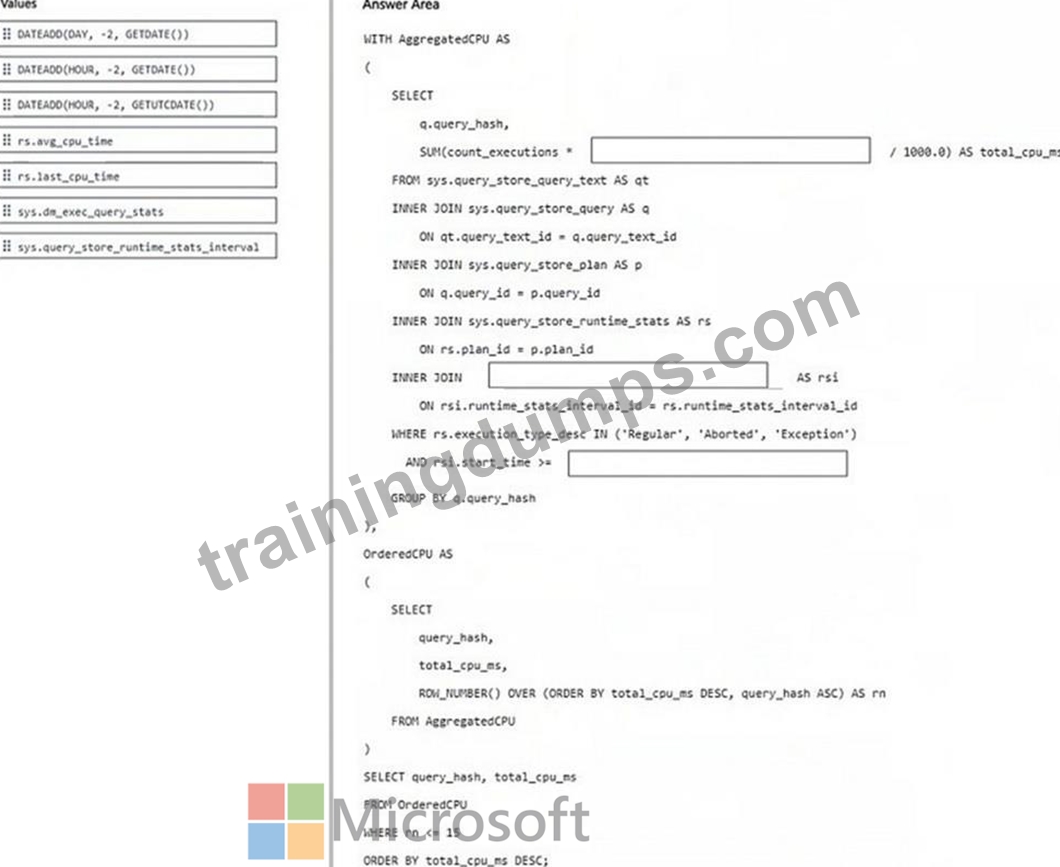
Answer:
Explanation: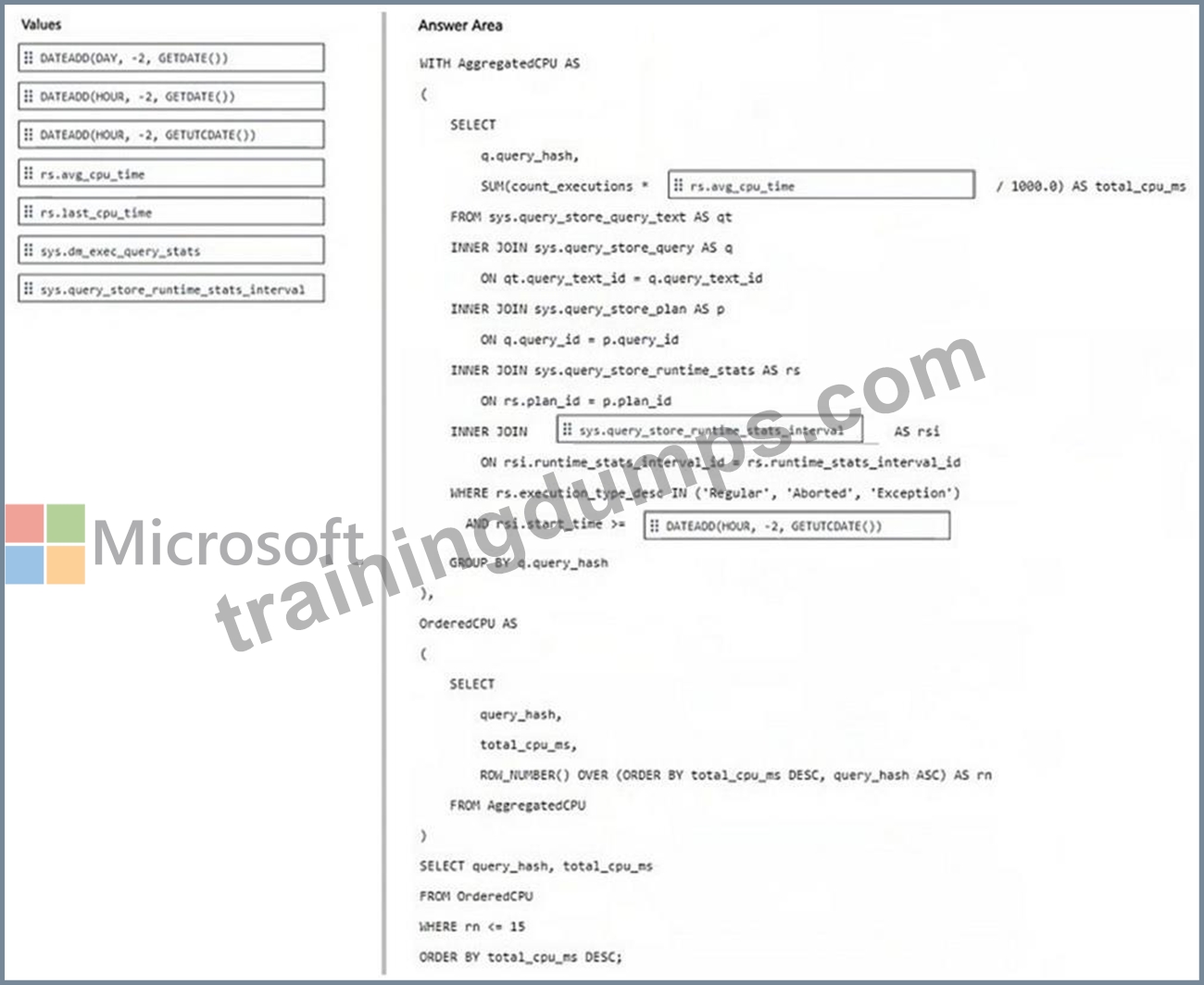
NEW QUESTION # 87
Note: This question is part of a series of questions that present the same scenario. Each question in the series contains a unique solution that might meet the stated goals. Some question sets might have more than one correct solution, while others might not have a correct solution.
After you answer a question in this section, you will NOT be able to return to it. As a result, these questions will not appear in the review screen.
You have an SDK-style SQL database project stored in a Git repository. The project targets an Azure SQL database.
The CI build fails with unresolved reference errors when the project references system objects.
You need to update the SQL database project to ensure that dotnet buildvalidates successfully by including the correct system objects in the database model for Azure SQL Database.
Solution: Add an artifact reference to the Azure SQL Database master.dacpac file.
Does this meet the goal?
- A. No
- B. Yes
Answer: A
Explanation:
Correct:
* Add the Microsoft.SqlServer.Dacpacs.Azure.Master NuGet package to the project.
To resolve system reference errors in an SDK-style SQL project targeting Azure SQL Database, you need to add a reference to the Microsoft.SqlServer.Dacpacs.Azure.Master NuGet package.
In your .sqlproj file, include the following item group:
<ItemGroup>
<PackageReference Include="Microsoft.SqlServer.Dacpacs.Azure.Master" Version="1.60.0" />
</ItemGroup>
Why this works:
System Objects: Standard SDK-style projects don't automatically include system views (like sys.database_principals or sys.dm_db_resource_stats). This package provides the necessary metadata for the compiler.
Azure Specifics: It includes Azure-only system objects that aren't present in the standard master database dacpac used for on-premises SQL Server.
CI/CD Friendly: Since it is a NuGet package, the dotnet build command will automatically restore it during the CI process without requiring manual file paths or local installations of Visual Studio.
Incorrect:
* Add an artifact reference to the Azure SQL Database master.dacpac file.
* Add the Microsoft.SqlServer.Dacpacs.Master NuGet package to the project.
Reference:
https://learn.microsoft.com/en-us/sql/tools/sql-database-projects/concepts/system-objects
NEW QUESTION # 88
......
Microsoft DP-800 Exam Syllabus Topics:
| Topic | Details |
|---|---|
| Topic 1 |
|
| Topic 2 |
|
| Topic 3 |
|
Valid DP-800 Exam Updates - 2026 Study Guide: https://www.trainingdumps.com/DP-800_exam-valid-dumps.html
DP-800 Certification - The Ultimate Guide: https://drive.google.com/open?id=1WKD-GuvouAuTuibJnkjZcNmGD49b7Vao
