

New SAP C-THR86-2405 Dumps & Questions Updated on 2025
Dumps to Pass your C-THR86-2405 Exam with 100% Real Questions and Answers
NEW QUESTION # 40
How many custom columns may be used as Formula Criteria for Guidelines?
- A. There is no limit on custom columns
- B. 0
- C. 1
- D. 2
Answer: C
NEW QUESTION # 41
You want to rename the Salary tab of the compensation plan template.Which field section must you configure?
- A. Navigation Fields
- B. Form Fields
- C. Rollup Report Fields
- D. Custom Views
Answer: A
NEW QUESTION # 42
Your customer is based in the UK has a functional currency of GBP. However, they also have offices in the US (USD), France (EUR), Germany (EUR). They would like the budget displayed in local currency for all planners - for example, German planners see the budget in EUR, not GBP.
How can you best accomplish this?
Note: There are 2 correct answers to this question.
- A. Disable Functional Currency mode.
- B. Enable Planner Currency mode.
- C. Have four separate templates, one for each country.
- D. Use budget grouping group on the local currency code.
Answer: B,D
NEW QUESTION # 43
Your customer has part-time full-time employees. You notice that for part-time employees, their compa-ratio in EC is different than in Compensation. What do you configure in the system to have it calculate the correct compa-ratio take into account the FTE?
- A. Set the XML attribute isActualSalaryImported to True in the compensation plan template ensure standard FTE field is used.
- B. Add values in the EC Pay Range object to align with each FTE.
- C. Create a custom Amount column to store FTE rather than using the standard FTE column.
- D. Set the XML attribute isActualSalary Imported to False in the compensation plan template ensure standard FTE field is used.
Answer: D
NEW QUESTION # 44
What is the recommended leading practice workflow for a compensation template?
- A. Process Setup # Manager Planning # Next Level Manager Review # Final Review # Complete
- B. Manager Planning # Next Level Manager Review # HR Manager Planning # Complete
- C. Manager Planning # Next Level Manager Review # Compensation Admin Review # HR Manager Planning # Complete
- D. Process Setup Manager Planning # Next Level Manager Review # Third Level Manager Review # Complete
Answer: A
Explanation:
The recommended workflow for compensation templates ensures structured review and approval, following best practices to ensure accuracy and compliance in compensation decisions.
* Recommended Workflow Stages
* Process Setup: The Compensation Admin configures the process.
* Manager Planning: Line managers make initial compensation recommendations.
* Next Level Manager Review: Next-level managers review and adjust recommendations as necessary.
* Final Review: HR or Compensation Admin conducts a final review to ensure compliance and data accuracy.
* Complete: The process is finalized and completed.
* Why Other Options Are Incorrect
* Options B, C, and D omit theFinal Reviewor include additional manager levels not typically required, making them less aligned with the standard leading practice.
* Reference Documentation
* SAP SuccessFactors Compensation Guide onCompensation Cycle WorkflowandTemplate Setup.
NEW QUESTION # 45
For which customer requirement do you need to develop a custom statement?
- A. Pie graph showing compensation element attribution
- B. Mix of data from compensation and variable pay
- C. Field visibility is conditional on amount
- D. Different statements per employee group
Answer: A
NEW QUESTION # 46
In an EC-integrated implementation, which of the following EC elements can be used to map fields?Note There are 3 correct answers to this question.
- A. Time Off
- B. Pay Components
- C. MDF Objects
- D. Biographical Information
- E. Background Elements
Answer: B,C,D
NEW QUESTION # 47
You ate implementing an EC-inlegrated template. Which compensation fields are commonly mapped to a pay component or pay component group?Note. There are 3 correct answers to this question.
- A. L FTE
- B. Local Currency Code
- C. Units Per Year
- D. Current Salary
- E. Pay Grade
Answer: B,C,D
NEW QUESTION # 48
In provisioning for your customer's instance you select the 'Assign default required field values for new users if none specified' option You want to import a compensation-specific user data file (UDF). Which columns are required.Note. There are 2 correct answers to this question.
- A. MANAGER
- B. STATUS
- C. USERNAME
- D. USERID
Answer: B,D
NEW QUESTION # 49
Your client, who uses SAP SuccessFactors Employee Central, wants to make sure that only employees who have been with the company more than 2 years are eligible for a Lump Sum.
How do you build the eligibility rule to make this happen?
- A. Check the Hire Date field to see if the employee started at least 2 years ago.
- B. Add help text to the Lump Sum field to notify planners only to use the field for eligible employees.
- C. Check if the Event Reason is New Hire the effective date is 2 years ago.
- D. Use the effective date from Job Info to check if the employee has been in this position for more than 2 years.
Answer: A
Explanation:
To configure eligibility based on tenure, you can use the Hire Date field in SAP SuccessFactors to determine how long an employee has been with the company.
* Option B: "Check the Hire Date field to see if the employee started at least 2 years ago."
* By configuring an eligibility rule that references the Hire Date, you can set criteria to check if the employee's start date is at least two years before the form's effective date. This ensures only employees with over two years of tenure are eligible for the Lump Sum.
NEW QUESTION # 50
Which of the following updates require worksheets to be relaunched? Note: There are 2 correct answers to this question.
- A. Update lookup table contents.
- B. Update a formula in a custom column.
- C. Modify the route map.
- D. Revise field-based permissions.
Answer: A,D
NEW QUESTION # 51
Your customer would Ike the Reward team to be able to override the final salary of the employee by directly entering in the final amount in Executive Review.However, they want to make sure that this is only posstole during the last week of the planning cycle.How can you achieve this?
- A. Create a custom read-only Money field and change read-only to No on the correct date.
- B. Create a custom editable Money field and use custom validation to check that values are not entered until the correct date
- C. Create a custom editable Money field In the formula to calculate the final salary, use the dateDIffO function to determine if the custom column can override the calculated value
- D. Create a custom editable Money field with field-based permissions set to read-only Change the permissions to editable on the correct date
Answer: D
NEW QUESTION # 52
What types of custom fields can you use as formula criteria within the guidelines.Note There are 2 correct answers to this question.
- A. Money fields based on a custom formula calculation
- B. String fields based on a custom formula calculation
- C. Percent fields input on the worksheet
- D. Date fields uploaded from the User Data File
Answer: C,D
NEW QUESTION # 53
Your customer would like the Reward team to be able to override the final salary of the employee by directly entering in the final amount in Executive Review. However, they want to make sure that this is only possible during the last week of the planning cycle.
How can you achieve this?
- A. Create a custom editable Money field with field-based permissions set to read-only. Change the permissions to editable on the correct date.
- B. Create a custom read-only Money field change read-only to No on the correct date.
- C. Create a custom editable Money field use custom validation to check that values are NOT entered until the correct date.
- D. Create a custom editable Money field. In the formula to calculate the final salary, use the dateDiff() function to determine if the custom column can override the calculated value.
Answer: D
NEW QUESTION # 54
Your customer uses a look-up table to calculate custom budgets, as shown in the screenshot.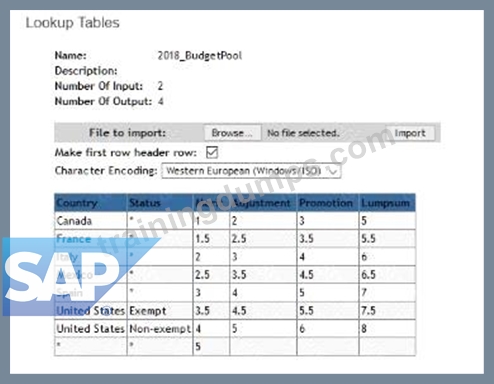
The budget is based on an employee s country and status In the template the country is defined with field ID customCountry and the status Is defined with field ID customStatus.What is the correct syntax to calculate the adjustment budget?
- A. toNumber(lookupf2018_BudgetPoor customCountrycustomStatus
- B. toNumberflookup('2018_BudgetPoor. customCountry customStatus2))'curSalary
- C. Adjustment))*curSalary
- D. toNumbGr(lookupC20l8_BudgetPoor.customCountry.cu$tomStatu$.1))'curSalary
- E. toNumber(lookup('20l8_BudgetPool'.customCountry.cuslomStatus.adjuslment))'curSalary
Answer: D
NEW QUESTION # 55
Your client has a requirement to set a custom Amount column called RSU Shares to 15 if the employee has a performance rating of 5 and a Pay Grade of 6 or 7. If the employee does not meet these conditions, then they receive 0 shares.What formulas could work for this requirement?Note There are 2 correct answers to this question.
- A. if(pmRating=5&&(payGrade=6| 7).15.0)
- B. iflpmRaling=5&&(payGrade=6| payGrade=7) 15 0)
- C. if(pmRating=5.if(payGrade=6 l5.if(payGrade=7 15.0)) 0)
- D. if(pmRating=5 AND payGrade=6 OR payGrade=7 15,0)
Answer: B,C
NEW QUESTION # 56
What happens when a mass change violates the guideline hard stops?
- A. Employees' recommendations will be skipped
- B. Guideline will adjust on a pro rata basis
- C. Employees are brought to max of range
- D. Guideline hard stops will be skipped
Answer: C
NEW QUESTION # 57
When would you run the Update All Worksheets function?Note There are 3 correct answers to this question.
- A. When an administrator makes a change to Field Based Permissions
- B. When there has been a change to an eligibility rule
- C. When an administrator changes the layout of the compensation plan template to add a new column
- D. When a performance rating is updated
- E. When there has been an update to a lookup table
Answer: B,D,E
NEW QUESTION # 58
Your non-EC customer v/ants only users in Pay Grade 1 and 2 to be ineligible for Lump Sum. Pay Grades 3 through 9 are eligible.What can you do to fulfill this requirement?Note. There are 3 correct answers to this question.
- A. Start with all employees are eligible In the UDF set the LUMPSUM_ELIGIBLE field to FALSE for Grades 1 and 2. and TRUE for Grades 3 through 9
- B. Start with all employees are eligible Using the legacy eligibility rules engine create a rule condition that makes the Pay Grades 1 and 2 ineligible for the Lump Sum field
- C. Start with all employees are ineligible using the legacy eligibility rules engine, create a rule condition that makes the Pay Grades 1 and 2 ineligible for the Lump Sum field
- D. Start with all employees are ineligible Using the legacy eligibility rules engine, create a rule condition that goes through the eligible Pay Grades and makes them eligible for the Lump Sum field
- E. Start with all employees are eligible Using the legacy eligibility rules engine create a rule condition that makes the Pay Grades 3 through 9 eligible for the Lump Sum field
Answer: A,B,D
NEW QUESTION # 59
Your customer wants the guidelines for an employee's merit recommendation to be prorated based on the employee's date of last hire The date of last hire is different than the employee's original hire date.How can you fulfill this requirement?
- A. Use raise proration and import the employee s last hire date in the RA1SE_PRORATING_START_DATE column
- B. Use salary proration and import the employee s last hire date in the SALARY_PRORATING_START_DATE column.
- C. Use raise proration and import a proration factor in the RAISE_PRORATING column
- D. Use salary proration and set the review start date equal to the employees last hire date
Answer: D
NEW QUESTION # 60
Which of the following Permissions is NOT recommended to be given to all HRBPs who are supporting a Salary Review Process?
- A. Report Permissions
- B. Executive Review Edit Permissions
- C. Compensation Management Permissions
- D. Executive Review Export Permissions
Answer: B
Explanation:
In SAP SuccessFactors Compensation, granting the appropriate permissions to HR Business Partners (HRBPs) is crucial to supporting the salary review process effectively while maintaining data security and integrity. The following permissions are typically managed with caution:
* Executive Review Edit Permissions (Option C):
* It is not recommended to grant all HRBPs "Executive Review Edit Permissions" as this allows for extensive changes across compensation plans, which may be inappropriate for all HRBP roles. This permission should generally be reserved for high-level administrators or managers who need to make adjustments at the executive review level.
Other Permissions:
* Executive Review Export Permissions (Option A)andReport Permissions (Option B)are commonly provided to HRBPs for data analysis.
* Compensation Management Permissions (Option D)is often necessary for HRBPs to carry out their roles effectively, enabling them to manage employee compensation-related tasks.
NEW QUESTION # 61
Your customer is going through a divestiture would like to extract all of the historical data from compensation planning for the divested entity prior to purging the data from SAP SuccessFactors. How can you capture the compensation data from your compensation plans? Note: There are 2 correct answers to this question.
- A. Run an Ad Hoc report.
- B. Export from Executive Review.
- C. Export from the employee history file.
- D. Run the Rollup report.
Answer: A,B
NEW QUESTION # 62
A customer wants to display a block of text on the compensation statement only if the merit increase percentage is greater than 10%. How would you proceed?
- A. Duplicate the standard merit field select the Show percent only radio button. Add this field to the statement template use it for the conditional logic.
- B. Configure an adjustment field to duplicate the merit field select the Show percent only radio button.Add this field to the statement template use it for the conditional logic.
- C. Use conditional logic in the statement to only display the paragraph if merit is greater than 10.
- D. Configure a new percent field with a formula within the compensation template add this field to the statement template. Use this field in the conditional logic.
Answer: D
NEW QUESTION # 63
Your customer wants to include information on the planning form that is visible and read-only to planners, but may be edited by the Reward Team. How can you achieve this?
- A. Configure a custom field and use field-based permissions to set the field to be hidden from planners
- B. Configure a custom field and set the field to be reportable
- C. Configure a custom field and use field based permissions to set the field to be non-editable to planners
- D. Configure a custom field and set the field to read-only
Answer: A
NEW QUESTION # 64
......
Updated Exam C-THR86-2405 Dumps with New Questions: https://www.trainingdumps.com/C-THR86-2405_exam-valid-dumps.html
Today Updated C-THR86-2405 Exam Dumps Actual Questions: https://drive.google.com/open?id=1LDL21w7tlsAVKiCT9EObRdv4YblyR9pL
