

[Jun 28, 2026] Fully Updated Free Actual Fortinet FCSS_EFW_AD-7.6 Exam Questions
Free FCSS_EFW_AD-7.6 Questions for Fortinet FCSS_EFW_AD-7.6 Exam [Jun-2026]
Fortinet FCSS_EFW_AD-7.6 Exam Syllabus Topics:
| Topic | Details |
|---|---|
| Topic 1 |
|
| Topic 2 |
|
| Topic 3 |
|
| Topic 4 |
|
| Topic 5 |
|
NEW QUESTION # 27
You need an internal segmentation firewall (ISFW) FortiGate for a campus with an ultralow latency interface. Which FortiGate should you select?
- A. FortiGate with ports X5 to X8.
- B. FortiGate with ports connected to a SP5.
- C. FortiGate with ports connected to a CP10.
- D. FortiGate with only one NP6.
Answer: B
Explanation:
The SP5 (Security Processing Unit 5) provides ultralow-latency hardware acceleration designed specifically for internal segmentation firewalls and east-west traffic inspection. A FortiGate model with ports connected to an SP5 delivers the required microsecond-level latency performance.
NEW QUESTION # 28
Which two statements about IKEv2 are true if an administrator decides to implement IKEv2 in the VPN topology? (Choose two.)
- A. It exchanges a minimum of two messages to establish a secure tunnel.
- B. It supports interoperability with devices using IKEv1.
- C. It includes stronger Diffie-Hellman (DH) groups, such as Elliptic Curve (ECP) groups.
- D. It supports the extensible authentication protocol (EAP).
Answer: C,D
Explanation:
IKEv2 (Internet Key Exchange version 2) is an improvement over IKEv1, offering enhanced security, efficiency, and flexibility in VPN configurations.
It includes stronger Diffie-Hellman (DH) groups, such as Elliptic Curve (ECP) groups. IKEv2 supports stronger cryptographic algorithms, including Elliptic Curve Diffie-Hellman (ECDH) groups such as ECP256 and ECP384, providing improved security compared to IKEv1.
It supports the extensible authentication protocol (EAP). IKEv2 natively supports EAP authentication, which allows integration with external authentication mechanisms such as RADIUS, certificates, and smart cards. This is particularly useful for remote access VPNs where user authentication must be flexible and secure.
NEW QUESTION # 29
To secure your enterprise network traffic, which step does FortiGate perform first, when handling the first packets of a session?
- A. Installation of the session key in the network processor (NP)
- B. A reverse path forwarding (RPF) check
- C. IP integrity header checking
- D. Decryption
Answer: B
Explanation:
When a new session begins, FortiGate first performs a reverse path forwarding (RPF) check to validate that the packet arrives on the correct interface according to the routing table. This prevents spoofing and ensures the packet is legitimate before any further inspection, decryption, or session offloading occurs.
NEW QUESTION # 30
A vulnerability scan report has revealed that a user has generated traffic to the website example.com (10.10.10.10) using a weak SSL/TLS version supported by the HTTPS web server.
What can the firewall administrator do to block all outdated SSL/TLS versions on any HTTPS web server to prevent possible attacks on user traffic?
- A. Enable auto-detection of outdated SSL/TLS versions in the SSL/SSH inspection profile to block vulnerable websites.
- B. Use the latest certificate, Fortinet_SSL_ECDSA256, and replace the CA certificate in the SSL/SSH inspection profile.
- C. Configure the unsupported SSL version and set the minimum allowed SSL version in the HTTPS settings of the SSL/SSH inspection profile.
- D. Install the required certificate in the client's browser or use Active Directory policies to block specific websites as defined in the SSL/SSH inspection profile.
Answer: C
Explanation:
The best way to block outdated SSL/TLS versions is to configure the SSL/SSH inspection profile to enforce a minimum SSL/TLS version and disable weak SSL versions.
By setting the minimum allowed SSL version in the HTTPS settings of the SSL/SSH inspection profile, FortiGate will:
# Block any connection using outdated SSL/TLS versions (such as SSLv3, TLS 1.0, or TLS 1.1).
# Enforce secure communication using only strong SSL/TLS versions (such as TLS 1.2 or TLS 1.3).
# Protect users from man-in-the-middle (MITM) and downgrade attacks that exploit weak encryption.
NEW QUESTION # 31
How would fec-ingress and fec-sgress IPsec configuration affect an IPsec tunnel?
- A. When an FGSP member in FortiGate fails, FortiGate flushes the corresponding tunnels and sends out dead peer detection probes to find unavailable remote peers.
- B. FortiGate will consider all IKEV2 packets as fragmentable.
- C. FortiGate will add additional redundant information to reconstruct any lost or erratically received packets.
- D. If fragmentation occurs, FortiGate will allow the packets at the IKE layer.
Answer: C
NEW QUESTION # 32
Refer to the exhibit, which shows a partial troubleshooting command output.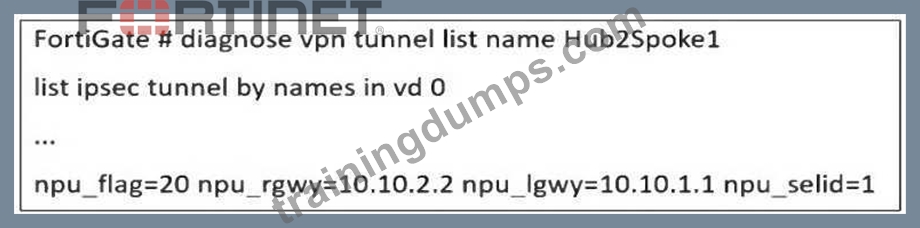
An administrator is extensively using IPsec on FortiGate. Many tunnels show information similar to the output shown in the exhibit.
What can the administrator conclude?
- A. The two IPsec SAs, inbound and outbound, are copied to the NPU.
- B. IPsec SAs cannot be offloaded.
- C. Only the inbound IPsec SA is copied to the NPU.
- D. Only the outbound IPsec SA is copied to the NPU.
Answer: A
Explanation:
The diagnose vpn tunnel list name Hub2Spoke1 command output provides key information about the offloading status of an IPsec VPN tunnel to the Network Processing Unit (NPU).
npu_flag=20:
This flag indicates that both inbound and outbound IPsec Security Associations (SAs) have been offloaded to the NPU, meaning the VPN traffic is processed in hardware instead of the CPU.
npu_rgwy=10.10.2.2 and npu_lgwy=10.10.1.1:
These IPs represent the remote gateway (rgwy) and local gateway (lgwy), confirming that the tunnel is successfully offloaded.
npu_selid=1:
This value means the session selector for the NPU offloaded SA is active.
Since both inbound and outbound SAs are offloaded, the administrator can conclude that the FortiGate NPU is handling IPsec encryption and decryption efficiently, reducing CPU load and improving VPN performance.
NEW QUESTION # 33
Refer to the exhibit, which shows the HA status of an active-passive cluster.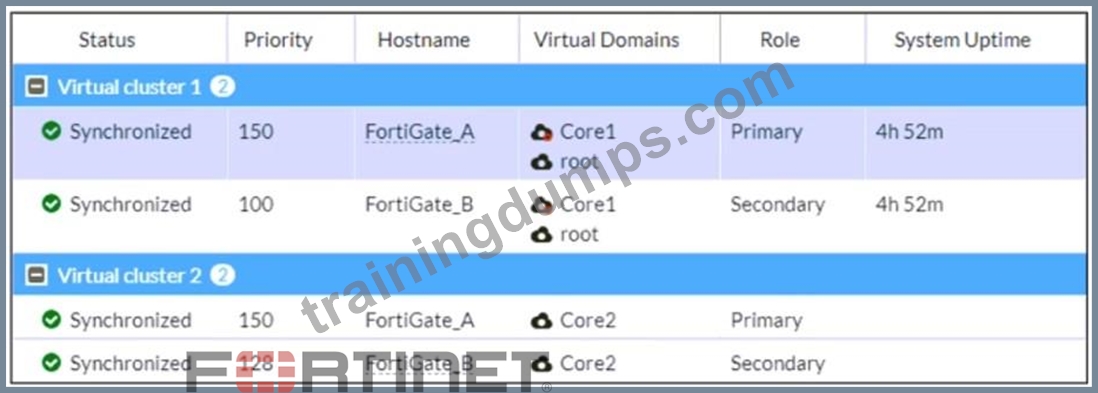
An administrator wants FortiGate_B to handle the Core2 VDOM traffic.
Which modification must the administrator apply to achieve this?
- A. The administrator must change the load balancing method on FortiGate_B.
- B. The administrator must disable override on FortiGate_A.
- C. The administrator must change the priority from 128 to 200 for FortiGate_B.
- D. The administrator must change the priority from 100 to 160 for FortiGate_B.
Answer: C
Explanation:
The exhibit shows an active-passive HA (high availability) cluster with two virtual clusters, where FortiGate_A is the primary device for both Core1 and Core2. If the goal is to have FortiGate_B take over Core2 traffic, its priority must be higher than FortiGate_A for Virtual Cluster 2.
Currently, FortiGate_A has a priority of 150 for Core2, while FortiGate_B has 128. Increasing FortiGate_B's priority to 200 ensures it becomes the primary for Virtual Cluster 2, taking over the Core2 VDOM traffic while keeping Core1 traffic on FortiGate_A.
Disabling override would prevent forced failovers but wouldn't change the role distribution. Adjusting the load-balancing method is irrelevant in an active-passive setup, as it only applies to active-active configurations.
NEW QUESTION # 34
An administrator received a FortiAnalyzer alert that a 1 ## disk filled up in a day. Upon investigation, they found thousands of unusual DNS log requests, such as JHCMQK.website.com, with no answers. They later discovered that DNS exfiltration was occurring through both UDP and TLS.
How can the administrator prevent this data theft technique?
- A. Enable DNS Filter to protect against DNS exfiltration.
- B. Use an IPS profile and DNS exfiltration-related signatures.
- C. Create an inline-CASB to protect against DNS exfiltration.
- D. Configure a File Filter profile to prevent DNS exfiltration.
Answer: B
Explanation:
The excessive DNS log requests with random subdomains suggest a DNS exfiltration attack, where attackers encode and transmit data via DNS queries. Since this technique can use both UDP and TLS (DoH - DNS over HTTPS), a comprehensive security approach is needed.
Using an IPS profile with DNS exfiltration-specific signatures allows FortiGate to:
# Detect and block abnormal DNS query patterns often used in exfiltration.
# Inspect encrypted DNS (DoH, DoT) traffic if SSL inspection is enabled.
# Identify known exfiltration domains and techniques based on FortiGuard threat intelligence.
NEW QUESTION # 35
Refer to the exhibit, which shows a network diagram.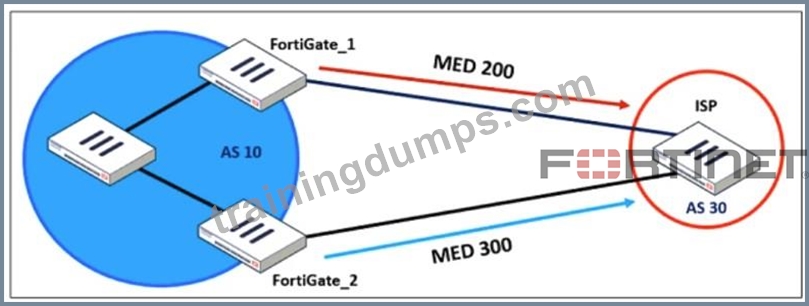
An administrator would like to modify the MED value advertised from FortiGate_1 to a BGP neighbor in the autonomous system 30.
What must the administrator configure on FortiGate_1 to implement this?
- A. distribute-list-out
- B. route-map-out
- C. network-import-check
- D. prefix-list-out
Answer: B
Explanation:
The Multi-Exit Discriminator (MED) is a BGP attribute used to influence the preferred path for incoming traffic from an external autonomous system (AS). The diagram shows that FortiGate_1 advertises MED 200, while FortiGate_2 advertises MED 300, meaning the ISP will prefer the route through FortiGate_1 because a lower MED is preferred in BGP.
To modify the MED value on FortiGate_1 for routes advertised to AS 30, the administrator must configure a route-map-out. A route map can match specific routes and set the MED value before sending them to the BGP neighbor.
NEW QUESTION # 36
Refer to the exhibit, which shows a hub and spokes deployment.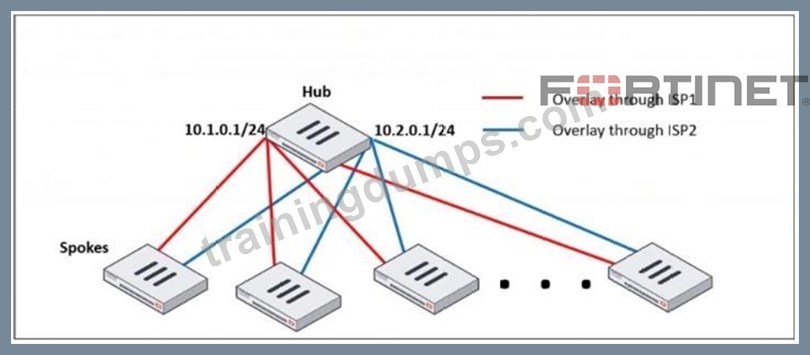
An administrator is deploying several spokes, including the BGP configuration for the spokes to connect to the hub.
Which two commands allow the administrator to minimize the configuration? (Choose two.)
- A. route-reflector-client
- B. neighbor-group
- C. ibgp-enforce-multihop
- D. neighbor-range
Answer: B,D
Explanation:
neighbor-group:
This command is used to group multiple BGP neighbors with the same configuration, reducing redundant configuration.
Instead of defining individual BGP settings for each spoke, the administrator can create a neighbor-group and apply the same policies, reducing manual work.
neighbor-range:
This command allows the configuration of a range of neighbor IPs dynamically, reducing the need to manually define each spoke neighbor.
It automatically adds BGP neighbors that match a given prefix, simplifying deployment.
NEW QUESTION # 37
Which statement about network processor (NP) offloading is true?
- A. The FortiGate CPU offloads all firewall sessions that require FortiOS session helper to the network processing unit (NPU).
- B. You can disable the NP for each firewall policy using the command np-acceleration set to loose.
- C. For UDP traffic, the FortiGate CPU offloads the first packet to identify it as fast-path traffic.
- D. When NP acceleration is enabled, firewall sessions may not offload if proxy-based security profiles are included in the firewall policy.
Answer: D
NEW QUESTION # 38
Refer to the exhibit, which shows a network diagram showing the addition of site 2 with an overlapping network segment to the existing VPN IPsec connection between the hub and site 1.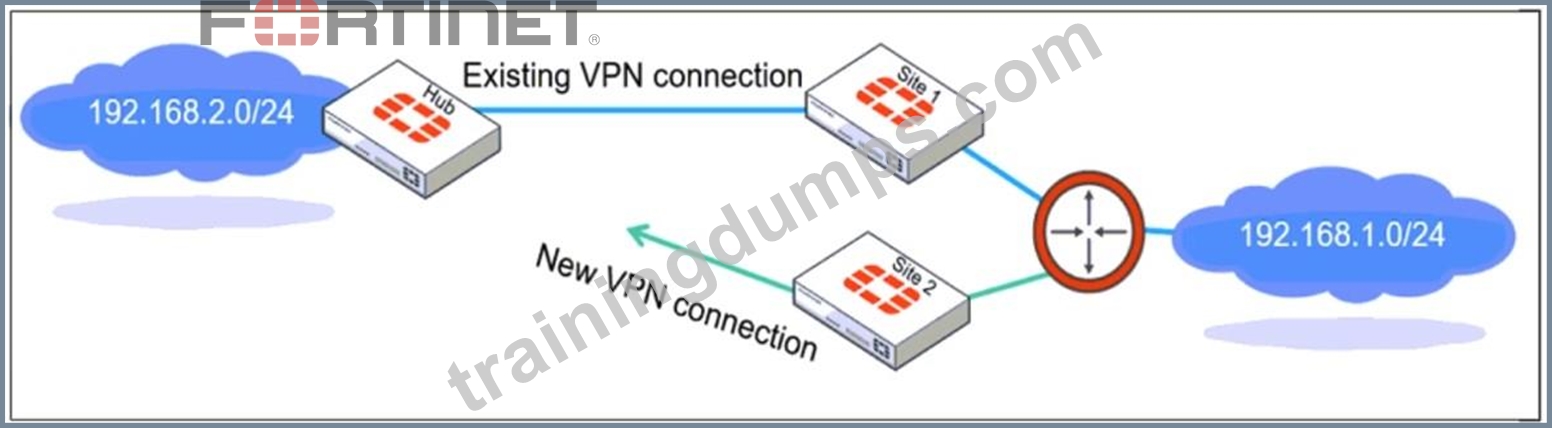
Which IPsec phase 2 configuration must an administrator make on the FortiGate hub to enable equal-cost multi-path (ECMP) routing when multiple remote sites connect with overlapping subnets?
- A. Set net-device to ecmp
- B. Set route-overlap to either use-new or use-old
- C. Set single-source to enable
- D. Set route-overlap to allow
Answer: B
Explanation:
When multiple remote sites connect to the same hub using overlapping subnets, FortiGate needs to determine which route should be used for traffic forwarding. The route-overlap setting in IPsec Phase 2 allows FortiGate to handle this scenario by deciding whether to keep the existing route (use-old) or replace it with a new route (use-new).
In an ECMP (Equal-Cost Multi-Path) routing setup, both routes should be retained and balanced, but FortiGate does not support ECMP directly over overlapping routes in IPsec Phase 2. Instead, an administrator must decide which connection takes precedence using route-overlap settings.
NEW QUESTION # 39
A user reports that their computer was infected with malware after accessing a secured HTTPS website. However, when the administrator checks the FortiGate logs, they do not see that the website was detected as insecure despite having an SSL certificate and correct profiles applied on the policy.
How can an administrator ensure that FortiGate can analyze encrypted HTTPS traffic on a website?
- A. The administrator must enable URL extraction from SNI on the SSL certificate inspection to ensure the TLS three-way handshake is correctly analyzed by FortiGate.
- B. The administrator must enable DNS over TLS to protect against fake Server Name Indication (SNI) that cannot be analyzed in common DNS requests on HTTPS websites.
- C. The administrator must enable reputable websites to allow only SSL/TLS websites rated by FortiGuard web filter.
- D. The administrator must enable full SSL inspection in the SSL/SSH Inspection Profile to decrypt packets and ensure they are analyzed as expected.
Answer: D
Explanation:
FortiGate, like other security appliances, cannot analyze encrypted HTTPS traffic unless it decrypts it first. If only certificate inspection is enabled, FortiGate can see the certificate details (such as the domain and issuer) but cannot inspect the actual web content.
To fully analyze the traffic and detect potential malware threats:
Full SSL inspection (Deep Packet Inspection) must be enabled in the SSL/SSH Inspection Profile.
This allows FortiGate to decrypt the HTTPS traffic, inspect the content, and then re-encrypt it before forwarding it to the user.
Without full SSL inspection, threats embedded in encrypted traffic may go undetected.
NEW QUESTION # 40
Refer to the exhibit, which contains the partial output of an OSPF command.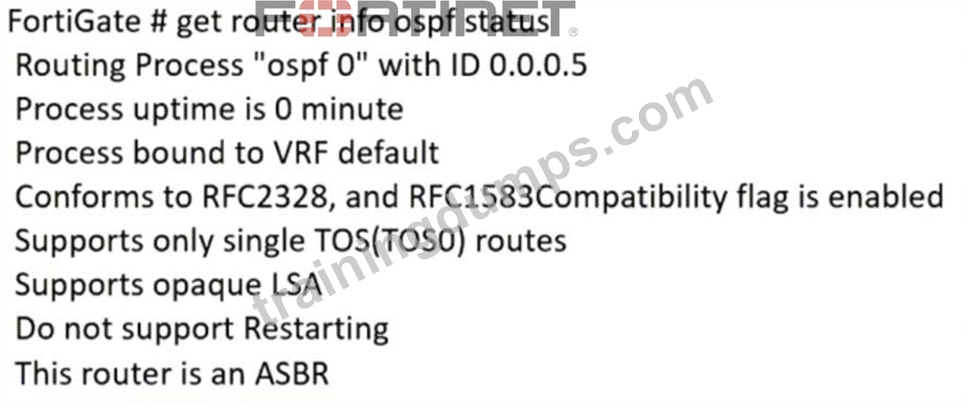
An administrator is checking the OSPF status of a FortiGate device and receives the output shown in the exhibit.
Which statement on this FortiGate device is correct?
- A. The FortiGate device is a backup designated router.
- B. The FortiGate device is in the area 0.0.0.5.
- C. The FortiGate device can inject external routing information.
- D. The FortiGate device does not support OSPF ECMP.
Answer: C
Explanation:
From the OSPF status output, the key information is:
# "This router is an ASBR" # This means the FortiGate is acting as an Autonomous System Boundary Router (ASBR).
# An ASBR is responsible for injecting external routing information into OSPF from another routing protocol (such as BGP, static routes, or connected networks).
NEW QUESTION # 41
An administrator is configuring two FortiGate devices in an HA cluster. While configuring the devices, the administrator issues the following commands on both HA cluster members:
In which two ways do these commands impact the HA cluster? (Choose two.)
- A. They force the former primary to shut down all its interfaces for one second when failover happens, excluding the heartbeat and reserved management interfaces.
- B. They force both HA devices for remote link monitoring to detect an issue in the forwarding path.
- C. They force the former primary to send gratuitous ARP packets when the failover happens to indicate that the virtual MAC address is now using a different device.
- D. They force the switches to update their MAC forwarding tables, when failover happens.
Answer: A,D
Explanation:
In most networks, that's enough for the switches to update their MAC forwarding tables with the new information.
However, some high-end switches might not clear their MAC tables correctly after a failover. So, they keep sending packets to the former primary even after receiving the gratuitous ARPs. In these cases, you should use the command shown on this slide to force the former primary to shut down all its interfaces for one second when the failover happens, excluding heartbeat and reserved management interfaces. This simulates a link failure that clears the related entries from the MAC table of the switches.
NEW QUESTION # 42
Refer to the exhibit. A pre-run CLI template that is used in zero-touch provisioning (ZTP) and low- touch provisioning (LTP) with FortiManager is shown.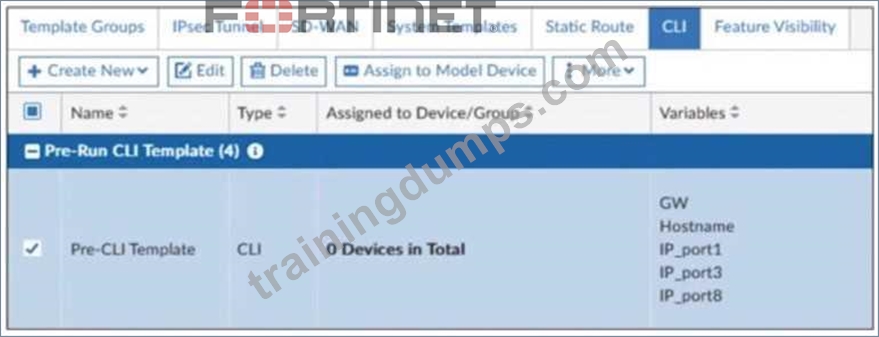
The template is not assigned even though the configuration has already been installed on FortiGate.
What is true about this scenario?
- A. Pre-run CLI templates are automatically unassigned after their initial installation
- B. The administrator did not assign the template correctly when adding the model device because pre-CLI templates remain permanently assigned to the firewall
- C. Pre-run CLI templates for ZTP and LTP must be unassigned manually after the first installation to avoid conflicting error objects when importing a policy package
- D. The administrator must use post-run CLI templates that are designed for ZTP and LTP
Answer: A
Explanation:
In FortiManager, pre-run CLI templates are used in Zero-Touch Provisioning (ZTP) and Low- Touch Provisioning (LTP) to configure a FortiGate device before it is fully managed by FortiManager.
These templates apply configurations when a device is initially provisioned. Once the pre-run CLI template is executed, FortiManager automatically unassigns it from the device because it is not meant to persist like other policy configurations. This prevents conflicts and ensures that the FortiGate configuration is not repeatedly applied after the initial setup.
NEW QUESTION # 43
An administrator received a FortiAnalyzer alert that a 1 disk filled up in a day. Upon investigation, they found thousands of unusual DNS log requests, such as JHCMQK.website.com, with no answers. They later discovered that DNS exfiltration was occurring through both UDP and TLS. How can the administrator prevent this data theft technique?
- A. Enable DNS Filter to protect against DNS exfiltration.
- B. Use an IPS profile and DNS exfiltration-related signatures.
- C. Create an inline-CASB to protect against DNS exfiltration.
- D. Configure a File Filter profile to prevent DNS exfiltration.
Answer: B
Explanation:
The excessive DNS log requests with random subdomains suggest a DNS exfiltration attack, where attackers encode and transmit data via DNS queries. Since this technique can use both UDP and TLS (DoH - DNS over HTTPS), a comprehensive security approach is needed.
Using an IPS profile with DNS exfiltration-specific signatures allows FortiGate to:
Detect and block abnormal DNS query patterns often used in exfiltration. Inspect encrypted DNS (DoH, DoT) traffic if SSL inspection is enabled. Identify known exfiltration domains and techniques based on FortiGuard threat intelligence.
NEW QUESTION # 44
Refer to the exhibits. The exhibits show a network topology, a firewall policy, and an SSL/SSH inspection profile configuration.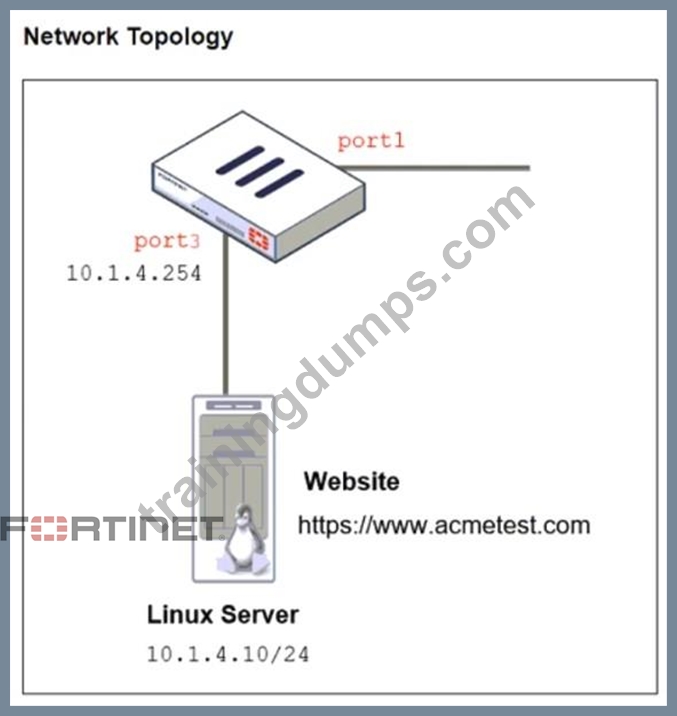
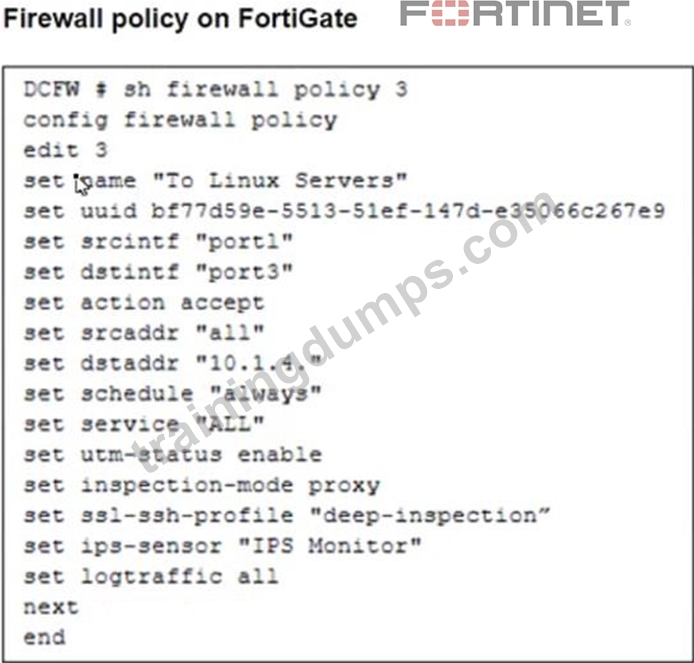
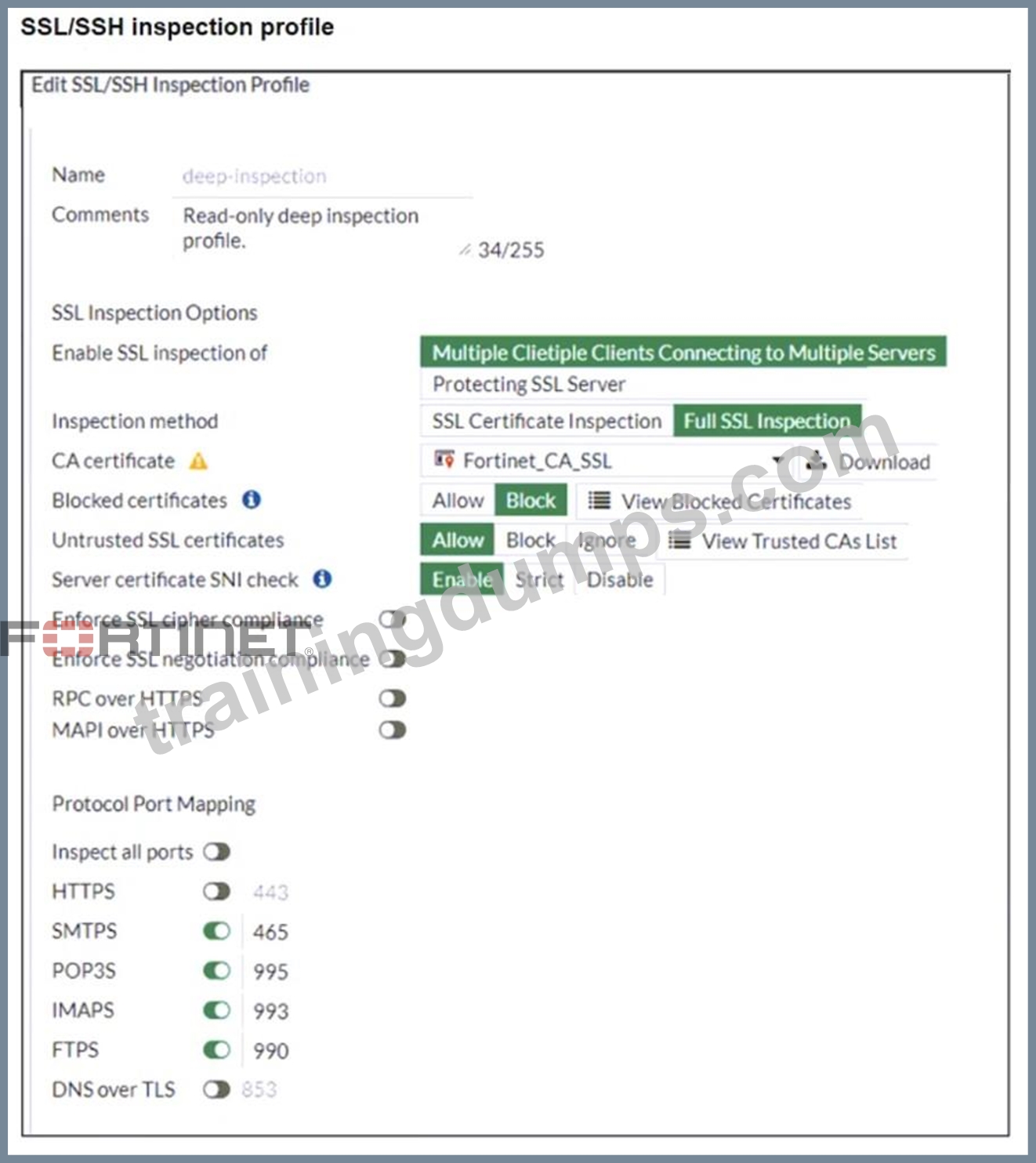
Why is FortiGate unable to detect HTTPS attacks on firewall policy ID 3 targeting the Linux server?
- A. The administrator must enable HTTPS in the protocol port mapping of the deep- inspection SSL/SSH inspection profile.
- B. The administrator must enable SSL inspection of the SSL server and upload the certificate of the Linux server website to the SSL/SSH inspection profile.
- C. The administrator must set the policy to inspection mode to analyze the HTTPS packets as expected.
- D. The administrator must enable cipher suites in the SSL/SSH inspection profile to decrypt the message.
Answer: B
Explanation:
The FortiGate SSL/SSH inspection profile is configured for Full SSL Inspection, which is necessary to analyze encrypted HTTPS traffic. However, the firewall policy is protecting an SSL server (the Linux server hosting the website), and currently, the SSL/SSH profile only applies to client-side SSL inspection.
To detect HTTPS-based attacks targeting the Linux server:
# FortiGate must act as an SSL intermediary to inspect encrypted traffic destined for the web server.
# The administrator must upload the SSL certificate of the Linux web server to FortiGate so that the server-side SSL inspection can decrypt incoming HTTPS traffic before analyzing it.
NEW QUESTION # 45
Refer to the exhibit, which shows an ADVPN network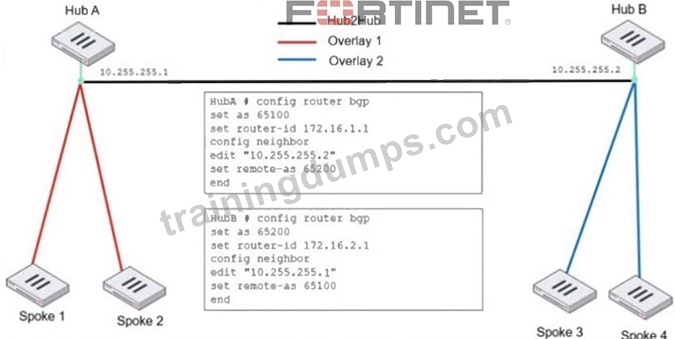
An administrator must configure an ADVPN using IBGP and EBGP to connect overlay network 1 with 2.
What two options must the administrator configure in BGP? (Choose two.)
- A. set next-hop-self enable
- B. set ibgp-enforce-multihop advpn
- C. set ebgp-enforce-multrhop enable
- D. set attribute-unchanged next-hop
Answer: A,C
Explanation:
In this ADVPN (Auto-Discovery VPN) network, there are two hubs (Hub A and Hub B) connected via EBGP, while IBGP is used within each overlay. To ensure proper BGP routing between the overlays, the administrator must configure specific BGP options..
set ebgp-enforce-multihop enable
By default, EBGP requires directly connected neighbors. Since Hub A and Hub B are not directly connected but reach each other over an IPsec tunnel, multihop must be enabled for EBGP sessions to work.
set next-hop-self enable
In IBGP, the next-hop attribute does not change by default. When an IBGP route is advertised from a spoke to another hub or spoke, the next-hop needs to be updated to ensure proper reachability. Enabling next-hop-self forces the BGP speaker to advertise itself as the next-hop, ensuring that all spokes properly reach routes across the overlays.
NEW QUESTION # 46
A vulnerability scan report has revealed that a user has generated traffic to the website example.com using a weak SSL/TLS version supported by the HTTPS web server. What can you do to block all outdated SSL/TLS versions on any HTTPS web server to prevent possible attacks on user traffic?
- A. Enable auto-detection of outdated SSL/TLS versions in the SSL/SSH inspection profile to block vulnerable websites.
- B. Block invalid SSL certificates in the SSL/SSH inspection profile.
- C. Configure the unsupported SSL version and set the minimum allowed SSL version in the HTTPS settings of the SSL/SSH inspection profile.
- D. Enable server certificate SNI check in the SSL/SSH inspection profile.
Answer: C
Explanation:
Blocking outdated SSL/TLS versions requires explicitly defining which protocol versions are disallowed. In the SSL/SSH inspection profile, setting the minimum allowed SSL/TLS version and configuring unsupported versions ensures that connections using weak or legacy protocols are blocked for all HTTPS web servers.
NEW QUESTION # 47
Refer to the exhibit, which shows an ADVPN network.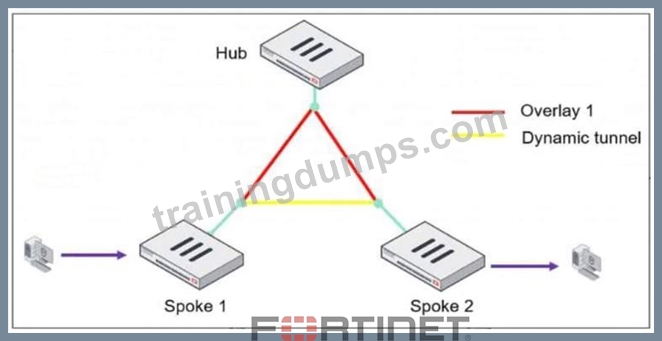
The client behind Spoke-1 generates traffic to the device located behind Spoke-2.
What is the first message that the hub sends to Spoke-1 to bring up the dynamic tunnel?
- A. Shortcut reply
- B. Shortcut query
- C. Shortcut offer
- D. Shortcut forward
Answer: C
Explanation:
In an ADVPN (Auto-Discovery VPN) network, a dynamic VPN tunnel is established on-demand between spokes to optimize traffic flow and reduce latency.
Process:
1. Traffic Initiation:
A client behind Spoke-1 sends traffic to a device behind Spoke-2.
The traffic initially flows through the hub, following the pre-established overlay tunnel.
2. Hub Detection:
The hub detects that Spoke-1 is communicating with Spoke-2 and determines that a direct shortcut tunnel between the spokes can optimize the connection.
3. Shortcut Offer:
The hub sends a "Shortcut Offer" message to Spoke-1, informing it that a direct dynamic tunnel to Spoke-
2 is possible.
4. Tunnel Establishment:
Spoke-1 and Spoke-2 then negotiate and establish a direct IPsec tunnel for communication.
NEW QUESTION # 48
A company's guest internet policy, operating in proxy mode, blocks access to Artificial Intelligence Technology sites using FortiGuard. However, a guest user accessed a page in this category using port 8443.
Which configuration changes are required for FortiGate to analyze HTTPS traffic on nonstandard ports like
8443 when full SSL inspection is active in the guest policy?
- A. Add a URL wildcard domain to the website CA certificate and use it in the SSL/SSH Inspection Profile.
- B. Administrators can block traffic on nonstandard ports by enabling the SNI check in the SSL/SSH Inspection Profile.
- C. In the Protocol Port Mapping section of the SSL/SSH Inspection Profile, enter 443, 8443 to analyze both standard (443) and non-standard (8443) HTTPS ports.
- D. To analyze nonstandard ports in web filter profiles, use TLSv1.3 in the SSL/SSH Inspection Profile.
Answer: C
Explanation:
When FortiGate is operating in proxy mode with full SSL inspection enabled, it inspects encrypted HTTPS traffic by default on port 443. However, some websites may use non-standard HTTPS ports (such as 8443), which FortiGate does not inspect unless explicitly configured.
To ensure that FortiGate inspects HTTPS traffic on port 8443, administrators must manually add port 8443 in the Protocol Port Mapping section of the SSL/SSH Inspection Profile. This allows FortiGate to treat HTTPS traffic on port 8443 the same as traffic on port 443, enabling proper inspection and enforcement of FortiGuard category-based web filtering.
NEW QUESTION # 49
An administrator is configuring application control with FortiGate running in next-generation firewall (NGFW) policy-based mode.
Which two actions must the administrator take? (Choose two.)
- A. Configure the action as quarantine, if an application requires feedback to prevent instability.
- B. Configure central source network address translation (SNAT), if NAT is required.
- C. Specify an SSLISSH inspection profile on a consolidated policy.
- D. Create an application control profile and apply the profile to a firewall policy.
Answer: B,C
NEW QUESTION # 50
A FortiGate device with UTM profiles is reaching the resource limits, and the administrator expects the traffic in the enterprise network to increase.
The administrator has received an additional FortiGate of the same model.
Which two protocols should the administrator use to integrate the additional FortiGate device into this enterprise network? (Choose two.)
- A. FGCP in active-passive mode and with VDOM disabled
- B. FGSP with external load balancers
- C. FGCP in active-active mode and with switches
- D. VRRP with switches
Answer: B,C
Explanation:
When adding an additional FortiGate to an enterprise network that is already reaching its resource limits, the goal is to distribute traffic efficiently and ensure high availability.
FGSP (FortiGate Session Life Support Protocol) with external load balancers FGSP allows session-aware load balancing between multiple FortiGate units without requiring them to be in an HA (High Availability) cluster.
With external load balancers, incoming traffic is evenly distributed across multiple FortiGate devices.
This approach is useful for scaling out traffic handling capacity while ensuring that sessions remain synchronized between firewalls.
FGSP is effective when stateful failover is required but without the constraints of traditional HA.
FGCP (FortiGate Clustering Protocol) in active-active mode and with switches FGCP active-active mode enables multiple FortiGate devices to share traffic loads, increasing throughput and efficiency.
Active-active mode is suitable for balancing UTM processing across multiple FortiGates, making it ideal when resource limits are a concern.
Using switches ensures redundancy and avoids single points of failure in the network.
This mode is commonly used in enterprise networks where both scalability and redundancy are required.
NEW QUESTION # 51
Refer to the exhibit, which shows an enterprise network connected to an internet service provider.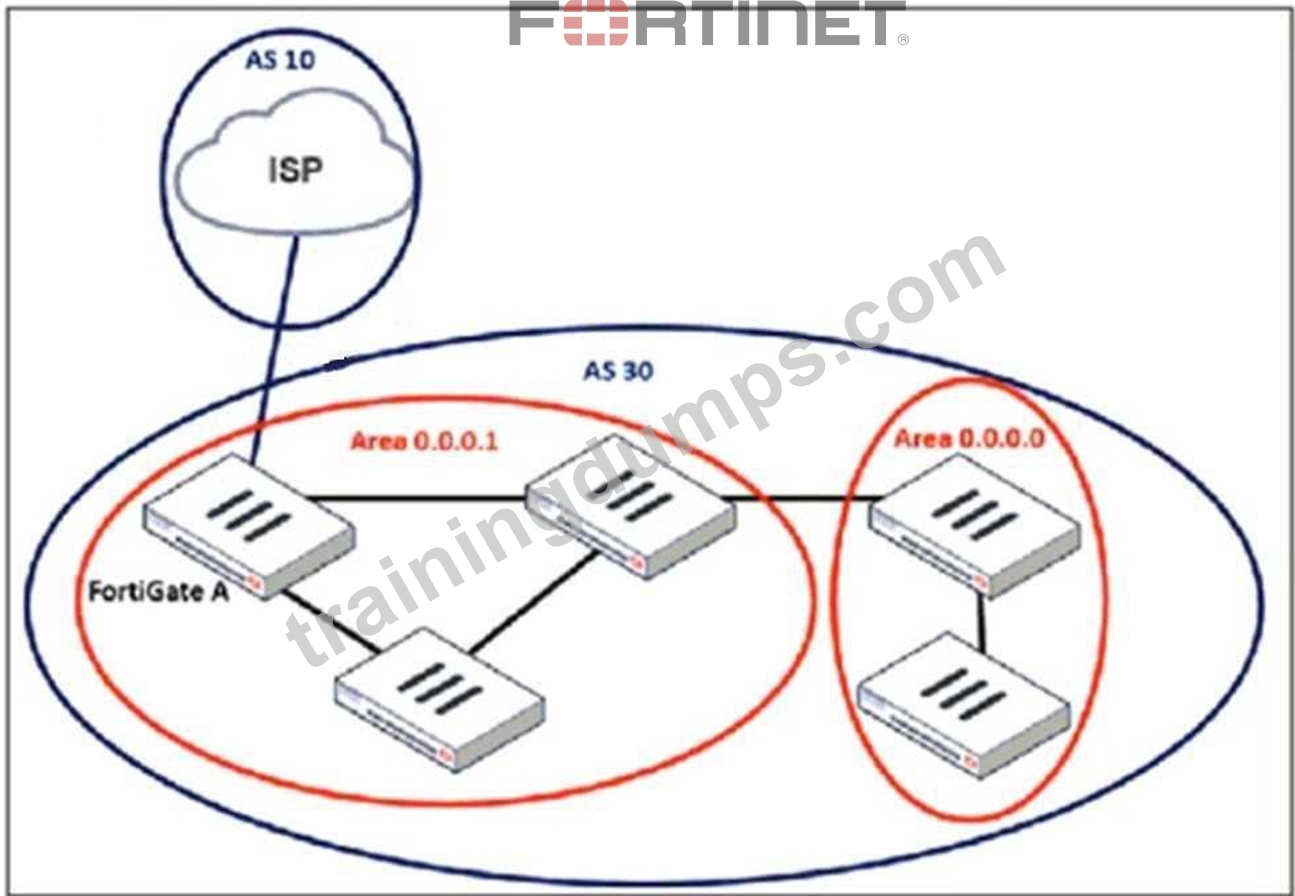
An administrator must configure a loopback as a BGP source to connect to the ISP.
Which two commands are required to establish the connection? (Choose two.)
- A. update-source
- B. ebgp-enforce-multihop
- C. ibgp-enforce-multihop
- D. recursive-next-hop
Answer: A,B
Explanation:
When configuring a loopback interface as the BGP source for connecting to an ISP, two important settings must be applied:
1. Enable EBGP Multihop (ebgp-enforce-multihop)
BGP normally expects directly connected neighbors, but since the ISP and FortiGate A are using loopback interfaces, packets will not be sent directly between their physical interfaces. The ebgp- enforce-multihop command allows BGP to form an eBGP peering over multiple hops.
2. Set the Update Source (update-source)
Since FortiGate is using a loopback interface as the source, the update-source command ensures that BGP updates originate from the loopback interface rather than a physical interface.
This is essential because BGP peers must match the source IP with the configured neighbor address.
NEW QUESTION # 52
......
Validate your FCSS_EFW_AD-7.6 Exam Preparation with FCSS_EFW_AD-7.6 Practice Test: https://www.trainingdumps.com/FCSS_EFW_AD-7.6_exam-valid-dumps.html
Get all the Information About Fortinet FCSS_EFW_AD-7.6 Exam 2026 Practice Test Questions: https://drive.google.com/open?id=14KwGg9dhzVYO-fdhzpgRronep4NTnQ45
