

Get Ready with AD0-E727 Exam Dumps (2025)
Realistic AD0-E727 Dumps are Available for Instant Access
NEW QUESTION # 90
A developer needs to add a custom block to a product page without replacing the existing layout XML. What is the best practice for adding this block?
Response:
- A. Use the env.php file to register the new layout.
- B. Merge the custom XML into the existing layout by extending the layout in the theme.
- C. Disable the default layout XML files in the admin panel.
- D. Modify the core layout XML directly in the vendor folder.
Answer: B
NEW QUESTION # 91
Which of the following actions can be performed using layout XML files in Adobe Commerce?
(Choose two)
Response:
- A. Define a custom block to display on a specific page.
- B. Assign CSS classes to specific blocks and containers.
- C. Set custom meta tags for the site.
- D. Modify JavaScript libraries for the entire site.
Answer: A,B
NEW QUESTION # 92
After a search engine optimization (SEO) audit, the agency requests to change all anchor links from the following format:
<a href="sample-link">Sample Link</a>
to a JavaScript-based solution which would allow to use <span> attributes instead <a> Which snippet will achieve this goal?
Response:
- A. <span click="sample-link">Sample Link</span>
- B. <span data-mage-init='{"redirectUrl": {"event": "click", "url": "sample-link"}}'>Sample Link</span>
- C. <span data-mage-init='{"redirect": {"url": "sample-link"}}'>Sample Link</span>
Answer: B
NEW QUESTION # 93
An Adobe Commerce developer is trying to remove a block using the <remove name="test.block'/> tag in a layout XML file but it shows an error and doesn't work. Which tag would be applied to fix the error?
Response:
- A. US6 <referenceBlock name="test.block" remove="true"/>
- B. Use<referenceBlock name="test.block" delete="true'7>
- C. Use <remove name="Custom_Module:test.block"/>
Answer: A
NEW QUESTION # 94
Which steps are necessary for creating and customizing PHTML templates in Adobe Commerce?
(Choose two)
Response:
- A. Directly modify the core templates in the vendor directory.
- B. Define the new template in the layout XML file.
- C. Edit the env.php file to include the custom template.
- D. Place the new template in the theme's Magento_Theme directory.
Answer: B,D
NEW QUESTION # 95
An Adobe Commerce developer needs to remove a UI component on the Checkout page. What would the developer use to disable a UI component using Layout XML?
Response:
- A.

- B.

- C.

- D.

Answer: D
NEW QUESTION # 96
A client's website is running very slowly after a recent deployment. An Adobe Commerce Developer notices that the full-page cache is disabled and needs to be turned back on. Which CLI command should the Developer use?
Response:
- A. bin/magento cache:enable full_page
- B. bin/magento cache:start full_page
- C. bin/magento cache:begin full_page
Answer: A
NEW QUESTION # 97
Which of the following techniques can improve front-end optimization in Adobe Commerce?
(Choose two)
Response:
- A. Disable JavaScript minification.
- B. Enable full-page caching.
- C. Enable image compression.
- D. Disable static file minification.
Answer: B,C
NEW QUESTION # 98
What file extension is used for PHTML template files in Adobe Commerce?
Response:
- A. .html
- B. .phtml
- C. .tpl
- D. .php
Answer: B
NEW QUESTION # 99
A client wants to add a slider widget to the homepage. How can the developer achieve this using Mage widgets?
Response:
- A. Create a new block in the admin panel.
- B. Directly modify the JavaScript files in the vendor directory.
- C. Add the slider through the env.php configuration file.
- D. Use the mage/gallery widget in the requirejs-config.js file.
Answer: D
NEW QUESTION # 100
A developer is working with Knockout.js on the checkout page and needs to bind user input fields to the view model. How can they achieve this using Knockout.js?
Response:
- A. Use jQuery to manually update the input fields.
- B. Modify the env.php file to enable bindings.
- C. Use the mage/validation module to handle bindings.
- D. Use the data-bind attribute to bind the input fields to the view model.
Answer: D
NEW QUESTION # 101
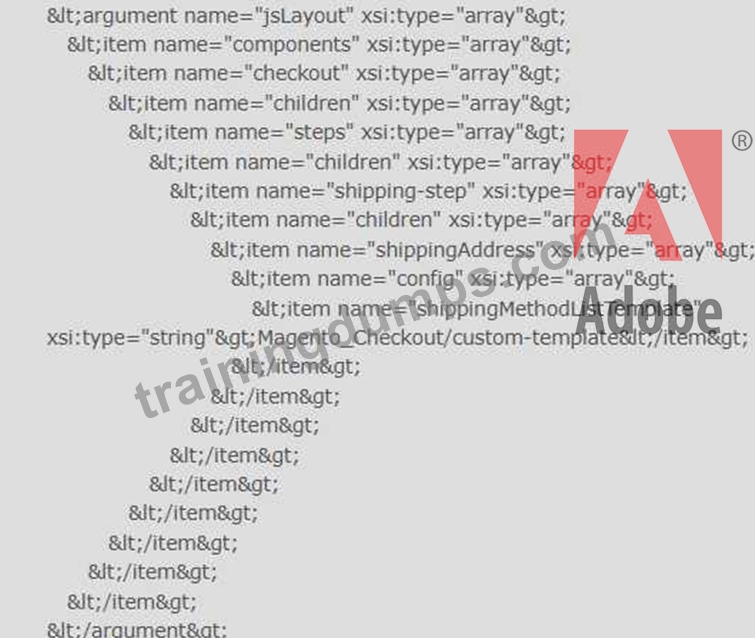
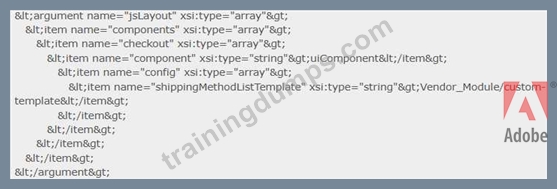
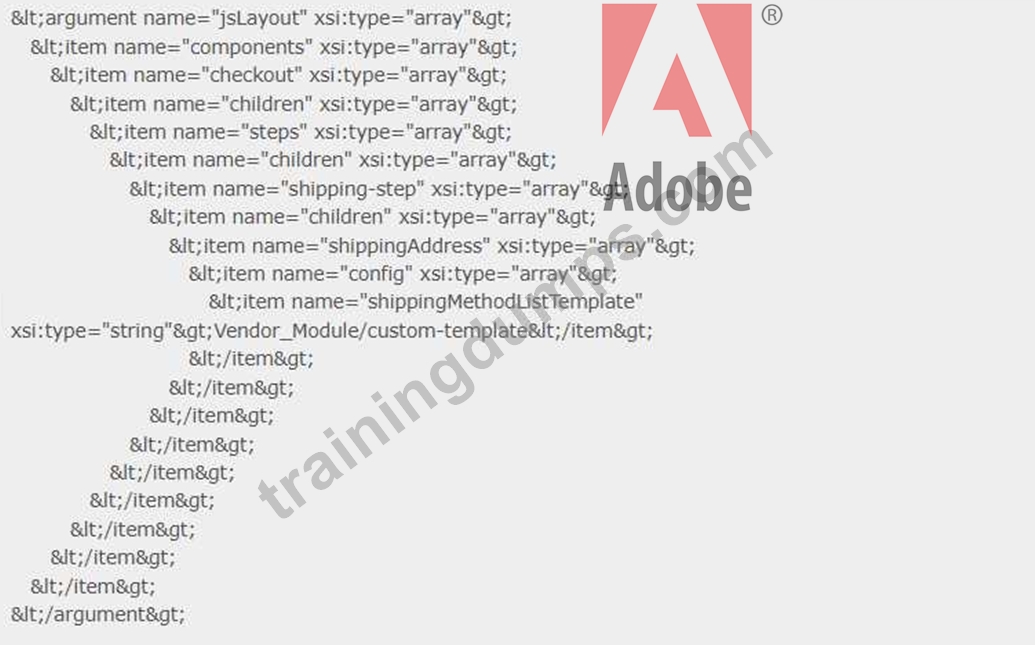
An Adobe Commerce developer wants to modify the template source of the shipping method list to be Vendor_Module/custom-template.
How would the developer make this modification in app/design/Magento_Checkout/layout/checkout_index_index.xml Response:
- A.
- B.
- C.
Answer: C
NEW QUESTION # 102
An Adobe Commerce developer is building a theme Vendor/Orange and needs to customize the header of email templates. Where in the theme does the developer need to place the new template for this customization?
Response:
- A. /Magento_Theme/html/header.html
- B. /Magento_Email/email/header.html
- C. /Magento_Email/templates/override/html/header.html
Answer: B
NEW QUESTION # 103
An Adobe Commerce developer wants to override the following Layout XML file in the theme ExampleCorp/orange.app/design/frontend/ExampleCorp/blank/Vendor_Module/layout/catalog_product_view.xml What path would the developer use inside the layout directory of the theme to override the file?
Response:
- A. /override/ExampleCorp/blank/catalog_product_view.xml
- B. /override/theme/ExampleCorp/blank/catalog_product_view.xml
- C. /catalog_product_view.xml
Answer: C
NEW QUESTION # 104
A client requests a product carousel for the homepage that displays featured products. How should the developer implement this using Mage widgets?
Response:
- A. Implement a third-party carousel plugin.
- B. Use the mage/gallery widget to create a carousel.
- C. Create a new block in the admin panel and add JavaScript manually.
- D. Customize the product template directly.
Answer: B
NEW QUESTION # 105
Which techniques can a developer use to improve front-end performance in Adobe Commerce?
(Choose two)
Response:
- A. Use the admin panel's built-in cache to disable caching.
- B. Implement full-page caching.
- C. Enable JS/CSS merging and minification.
- D. Increase the size of static content deployment files.
Answer: B,C
NEW QUESTION # 106
An Adobe Commerce Developer writes the following LESS code: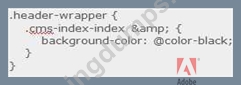
What will be the output of this code? Response:
- A. Background color black will not apply to the header-wrapper if it is inside cms-index-index class.
- B. Background color black will apply to the header-wrapper if it is inside cms-index-index class.
- C. Background color black will apply to the header-wrapper
Answer: B
NEW QUESTION # 107
Which two steps are required to delete a manually installed theme?
(Choose two.)
Response:
- A. Remove the theme record from the theme database table
- B. Remove the directory app/design/frontend/<VendorName>/<ThemeName>
- C. Disable the theme from the backend admin configuration
- D. Remove the theme using the theme:uninstall CLI command
Answer: A,B
NEW QUESTION # 108
What are some best practices for configuring RequireJS in Adobe Commerce?
(Choose two)
Response:
- A. Load only the necessary JavaScript modules on each page.
- B. Use the map configuration to avoid naming conflicts.
- C. Load core modules directly from the vendor folder.
- D. Define modules globally to be available across all pages.
Answer: A,B
NEW QUESTION # 109
How does Knockout.js help manage dynamic content in Adobe Commerce?
Response:
- A. Through two-way data binding, which automatically updates the view when the data model changes.
- B. By directly interacting with the admin panel.
- C. Through CSS manipulation.
- D. By handling backend database operations.
Answer: A
NEW QUESTION # 110
Where are the Magento UI library variables and default values stored?
Response:
- A. lib/web/css/source/variables.less
- B. lib/web/css/source/variables
- C. lib/web/css/source/lib/variables
- D. lib/source/lib/variables
Answer: C
NEW QUESTION # 111
How can a developer enable maintenance mode in Adobe Commerce using the CLI?
Response:
- A. Disable caching in the admin panel.
- B. Use the bin/magento cache:clean command.
- C. Run the bin/magento maintenance:enable command.
- D. Use Grunt to enable maintenance mode.
Answer: C
NEW QUESTION # 112
Which of the following tasks can be achieved using Adobe Commerce UI components?
(Choose two)
Response:
- A. Create dynamic forms that bind to the data model.
- B. Modify SQL queries in the database.
- C. Add modal popups for specific user actions.
- D. Handle custom payment gateways in the backend.
Answer: A,C
NEW QUESTION # 113
Which tool in Adobe Commerce allows developers to preview static content updates before they go live?
Response:
- A. Staging and Preview tool
- B. Cache Management
- C. Database management tool
- D. Static View Files Deployment
Answer: A
NEW QUESTION # 114
What are some key features of Knockout.js in Adobe Commerce?
(Choose two)
Response:
- A. Managing backend admin users
- B. Dependency tracking
- C. Two-way data binding
- D. Server-side rendering of HTML templates
Answer: B,C
NEW QUESTION # 115
......
Download Exam AD0-E727 Practice Test Questions with 100% Verified Answers: https://www.trainingdumps.com/AD0-E727_exam-valid-dumps.html
Share Latest AD0-E727Test Practice Test Questions, Exam Dumps: https://drive.google.com/open?id=12F9PdMHjBoq68nitir7j-9wZ61KX2Omf
